


Pump or Massage System Not Working: Connections, Relay Switch, and What to Check First
Updated September 2026
If your walk-in tub pump is not working and the jets or massage system will not turn on, please do not assume the pump has failed. In most of the cases the technical support team sees, the cause is a loose connection, a tripped outlet, or a small air lock in the control line, and all of these are things you can check yourself in a few minutes. Ella walk-in tubs use pneumatic push controls, which means the button on the deck sends an air signal through a thin tube to a relay switch inside the control box, and that relay is what powers the pump. This guide walks through the checks in the order the team uses them.
Start Here: Know Your Therapy Package
The first question the team asks on any jet or pump ticket is which therapy package is on your order, because the package determines which pumps and components your tub actually has. A hydro massage package has one hydro pump, a hydro plus air package has two pumps, and triple massage configurations have three. Your order confirmation lists the package, and your serial number lets the team look it up for you. Knowing the package tells you which components to check and keeps you from troubleshooting equipment your tub was never built with. The therapy package cheat sheet lists the pumps, heater and controls that come with each package.
Check Power Before Anything Else
Every Ella massage system runs on a dedicated, GFCI protected line, and a tripped GFCI or breaker is one of the most common causes of a completely unresponsive tub. Press the reset button on the GFCI outlet or breaker serving the tub, and confirm the breaker in your panel is on. Our article on electrical requirements by model covers the circuits each configuration needs, and if the tub went dark after a storm, see nothing works after a power outage.
Next, look at the control box behind the access panel. The control box has a green LED power indicator, and when the green light is on, power is reaching the box. If the green light is off, no power is flowing to the control box, and the problem is upstream in the outlet, cord, or circuit rather than in the tub itself. Also confirm the water is above the highest jets: the tub is designed to run only when the jets are submerged, and running a pump dry causes permanent damage.
How the Push Control Activates the Pump
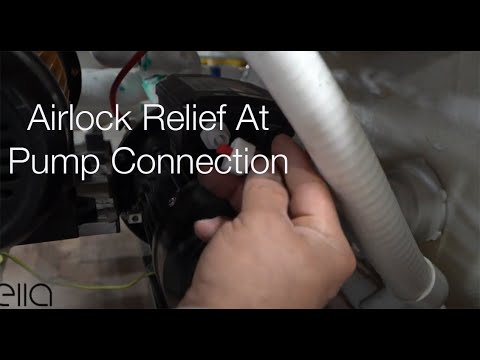
Inside the control box is a relay switch, and it is what activates the electricity to the pump. When you press the deck button, air travels down the tube and pushes the relay switch, so the whole system is pneumatic. Sometimes the air tube becomes air locked, meaning air is compressed inside the line and it stops sending a clean signal. The fix is simple: Watch: Ella's Bubbles: Relieving Air Lock at the pump connection with a full transcript.
- Disconnect the air tube from the relay switch fitting on the control box.
- Let the line relieve itself for a moment so the trapped air escapes.
- Reconnect the tube firmly to the relay switch fitting.
When you press a button you should hear an audible click inside the control box; that click is the relay being activated. A click with no pump means the problem is downstream at the pump or its cord; no click means the air signal is not arriving.
Check the Connection Between the Push Control and the Control Box

Chapters in this video
- 0:00 Understanding Air Signal Connections The technician explains how the push control sends an air signal to the control box via an air tube.
- 0:51 Securing Control Box Connections The technician demonstrates how to firmly plug the air tube onto the nipple of the control box.
- 1:03 Checking The Button Connection The technician shows how to retrieve the button from its housing using a flat screwdriver.
- 1:21 Securing The Pump Connection The technician pulls out the black pump part and secures the connection with the lock nut and hose.
- 1:40 Reassembling The Button The technician puts the pump and button back in place, securing it with the chrome ring.
When one massage system is not working, most of the time it is because there is no connection between the push control and the control box. The push control sends its air signal through a small air tube, and that tube must be secure at both ends. Watch: How to Secure Air & Hydro Connections in Your Walk-In Tub with chapters and a full transcript.
- At the control box, confirm the air tube is seated on its fitting. Plug it firmly onto the nipple, twisting and pushing at the same time to secure the connection.
- At the deck button, check the connection behind the button itself. Take a fine flat screwdriver, work it gently around the chrome ring, and pry the button out of its housing.
- Pull out the small black pump piece behind the button to reach the connection, then check the lock nut and the hose. If the hose is disconnected, reconnect it and make sure the lock nut is secure.
- Push the assembly back into place, replace the button, and press the chrome ring back on to hold it.
If a hose keeps popping off a button, the push-button air hose article covers which port each hose belongs on and how to reseat one that will not stay put.
Tubs with Two or Three Massage Systems: Check Every Pump

Chapters in this video
- 0:00 Troubleshooting Massager Malfunctions The technician explains that a common problem with massagers not working is an unplugged pump or component.
- 0:27 Checking Pump Power Connections The technician advises checking the pump and its power cord to ensure it is properly powered up.
- 0:42 Verifying Control Box Power The technician shows how to check the control box for a green light indicator, which means power is flowing to it.
On tubs with multiple massage systems, especially triple massage configurations such as the Ultimate, a single unplugged component can take out one whole system while the others work normally. On a triple massage tub, the control box runs two pumps, the air pump and the water pump, while the third pump is powered together with the in-line heater on its own line. If just one of your massage systems is dead: Watch: Proper Electrical Connections with chapters and a full transcript.
- Open the access panel and find the pump for the system that is not working.
- Check that the pump is plugged in and that its power cord is seated and undamaged.
- Confirm power is reaching that circuit, since the third pump and heater run on a separate line from the control box.
Still Not Running?
If the connections are secure, the green light is on, and a system still will not start, see our articles on touchpad and push control troubleshooting and on resetting the control box. Pumps, blowers and control components are covered under the Lifetime Limited Warranty for the original owner, and replacement pumps are available for any Ella tub. When you contact the team, please have your therapy package, your serial number, a photo of the pump label, and a short video of what happens when you press each button, and the team can often diagnose the relay, control box or pump by video and ship the part for your plumber to fit.
Related Guides
- Breaker or GFCI Keeps Tripping: Circuit Sizing, Component Loads, and When to Stop Using the Tub
- Hydro Pump Only Hums After a Repair: Why an Empty Tub Shows Nothing
- Control Box Configure Button: How Many Blinks, the One-Blink Reset, and the In-Line Heater Box
- The Hydro Pump Came Loose From the Frame in Shipping: How to Re-Bolt It
- Air Jets Work but the Hydro Jets Will Not Turn On: What to Check
- How to Reseal a Leaking Hydro Pump Intake on a Walk-In Tub
If the small fitting where the air tube connects has snapped off rather than just come loose, see the air tube fitting on my hydro pump snapped off: what part do I need for how to identify the hydro air switch and what to send the team.
If the pumps run but only the ozone (O3) button does nothing, see Ozone (O3) Button Does Nothing: Checking the Relay Click, the Air Tube, and Swapping Relays to Test.
Common Questions
The tub was just installed and nothing runs. What should I check?
On the Ultimate the back jets, air and light work but the foot jets do not.
The hydro pump hums but will not start.
The pump comes on as soon as the tub gets power and will not shut off.
Is there a reset button or fuse on the tub?
My electrician says power is fine but nothing runs.
Do you sell replacement pumps for older tubs?
The pump smoked and died. What does replacing it involve?
The pump smelled hot during the installer's test. Should I wait and see?
For anything specific to your model or serial number, open a ticket at ellasbubbles.com/support or call (800) 480-6850. The team is glad to help.
About this guide. Answers in the Ella’s Bubbles Support Center are compiled from real conversations with tub owners, our technicians’ notes and the product documentation, then reviewed by our team. Tub models and options have evolved over the years, so a detail here may differ slightly from your exact tub. If something looks different on yours, send us your serial number and a specialist will confirm it for your model.
Did this solve your question?
If not, open a ticket and our team will pick it up from here.
Open a Support Ticket Videos