


Heated Seat Not Warming Up: What to Check First and Which Parts Support Ships
Updated September 2026
If the heated seat and backrest never warm up, start with the indicator on the heater button. The red light should come on when the heater control button is pressed. If the light is on and the seat still feels cold, give it time and check the heating pads themselves before assuming a failure, because the warmth has to travel through thick acrylic. If the light never comes on, the cause is usually in the button, its connecting wire or the heater control box. Support ships the replacement parts under the parts warranty, and a local licensed electrician or your installer fits them.
Why the Seat Can Feel Cold at First
The heating pads sit behind the tub surface, and the acrylic is thick, so the surface takes time to feel warm after the element itself has heated. A seat that feels cool a short while after pressing the button is not yet a fault. If you can open the access panel, feel the heating pad directly. A pad that is warm while the surface is still cool means the heater is working and the surface simply needs longer. A pad that stays cold points to power or wiring. The seat and the backrest have their own heating pads, so note whether one area warms and another does not, and whether you judged that by feeling the pad or the inside surface of the tub. What the heated seat and backrest option is explains how the option works.
Check the Light and the Button
Press the heater control button and watch for the red light. If the light is dark, the detailed LED and button-prong checks are in checking the heater box LED and the button prongs. If the tub's main control box is also dark, follow the control box reset guide first. On soaking tubs with the heated seat as the only powered option, the soaking plus heated seat schematic shows how that wiring is laid out.
Which Parts Support Sends
Every tub is tested before it ships, so on a new installation support will first ask exactly what is happening before sending anything. After that, the parts are replaced in a logical order. Here is how the process runs.
- Open a ticket with your model, serial number and where you purchased.
- Describe exactly what happens: no light, a light with no heat, or only one area warming.
- Attach photos of the heater control box, the button and the wiring so support can see the configuration.
- Depending on the symptom, support sends a new heater control button, a longer connecting wire if the original will not reach, or the heater control box itself.
- Your installer or a licensed electrician fits the new parts. Ella's Bubbles does not send technicians, and labor is arranged locally.
If the button and wire are replaced and the light still does not come on, the heater control box is the next part support replaces. Once the light comes on, give the surface time to warm and check the pads again before reporting a further problem.
Other Things Worth Mentioning in Your Ticket
If the heater button is in an awkward spot for the bather, ask about relocating it. The button can be moved to a more convenient position, so raise it while the panel is open. If you bought a heated seat as an add-on kit and it fails at installation, support will ask what specifically is wrong before sending a replacement, so include the same photos and description. For the tub's main power box, see control box has no power light.
Related Guides
- How the optional heated seat and backrest works, and why it turns off after 20 minutes
- How Do I Install the Heated Seat and Back Pads on My Walk-In Tub?
- Why Isn't My Heated Seat Working?
- Does This Tub Include the Heated Seat and Backrest? Confirming the Configuration Before You Order
- Are the Heated Seat and In-Line Water Heater Covered by the Warranty?
- Are the Heated Seat and In-Line Heater Covered by Ella's Warranty?
Related Videos
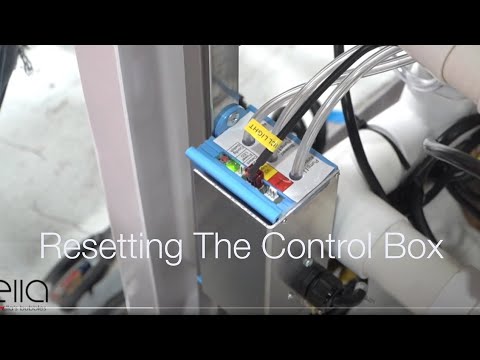
Chapters in this video
- 0:00 Disconnect Main Power Supply The video begins by showing how to disconnect the main power supply to the control box, and the green LED light goes out.
- 0:13 Disconnect All Function Connections The technician disconnects all function connections to the control box, recommending that each connection is marked before removal.
- 0:38 Disconnect Air and Water Pumps The technician disconnects all electrical connections to the air and water pumps that the tub may have.
- 0:59 Locate and Press Config Switch The technician locates the config switch on the control box and presses it until the green LED light cycles through its configuration process.
- 1:31 Reconnect Tub Components The technician reconnects all the tub's components, including the air and electrical lines, ensuring each is secured firmly.
- 1:49 Test All Tub Functions The technician tests all the tub's functions, including air, water, micro bubbles, and LED lights, to ensure they are working correctly.
Common Questions
How long does the heated seat take to warm up?
Should a light come on when I press the heater button?
Why does only part of the backrest feel warm?
What does support need before shipping a new heater box?
Is the heater box covered by the lifetime parts warranty?
Who installs the replacement heater box and wiring?
Still Need Help?
Open a ticket at ellasbubbles.com/support or call (800) 480-6850 and have your model and serial number ready.
About this guide. Answers in the Ella’s Bubbles Support Center are compiled from real conversations with tub owners, our technicians’ notes and the product documentation, then reviewed by our team. Tub models and options have evolved over the years, so a detail here may differ slightly from your exact tub. If something looks different on yours, send us your serial number and a specialist will confirm it for your model.
Did this solve your question?
If not, open a ticket and our team will pick it up from here.
Open a Support Ticket Videos