


How to Reset Your Walk-In Tub Control Box Step by Step
Updated October 2026
To reset your walk-in tub control box, disconnect the main power, label and unplug every air tube and electrical connection, restore power, hold the config button until the green LED cycles through one, two, three and four blinks, then reconnect everything and test each function. The control box is the electronic brain of your Ella walk-in tub: it receives the air signals from your deck controls and powers the pumps and lights, so when several functions act up at once, a full reset of the control box often clears the problem. This guide walks you through it exactly as our technical support team demonstrates it. Plan on about fifteen minutes, and have some masking tape and a marker ready to label the connections before you remove anything.
Before You Begin
- Locate the control box behind the removable access panel on the front apron of your tub. Planning service access shows where the panels are on each family.
- Mark every tube and connector before removal so each one goes back in the correct position. This step matters, and we highly recommend it.
- Handle electrical connectors slowly and carefully to avoid damaging any pins.
Step by Step Reset
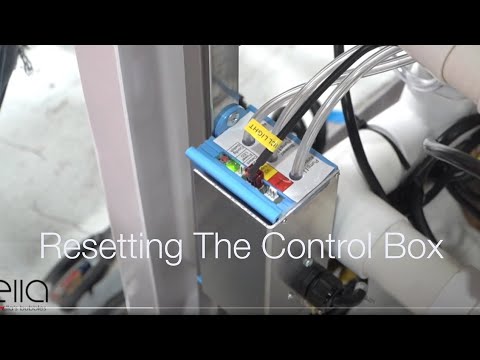
Chapters in this video
- 0:00 Disconnect Main Power Supply The video begins by showing how to disconnect the main power supply to the control box, and the green LED light goes out.
- 0:13 Disconnect All Function Connections The technician disconnects all function connections to the control box, recommending that each connection is marked before removal.
- 0:38 Disconnect Air and Water Pumps The technician disconnects all electrical connections to the air and water pumps that the tub may have.
- 0:59 Locate and Press Config Switch The technician locates the config switch on the control box and presses it until the green LED light cycles through its configuration process.
- 1:31 Reconnect Tub Components The technician reconnects all the tub's components, including the air and electrical lines, ensuring each is secured firmly.
- 1:49 Test All Tub Functions The technician tests all the tub's functions, including air, water, micro bubbles, and LED lights, to ensure they are working correctly.
Watch: Ella's Bubbles: Control Box Reset with chapters and a full transcript.
- Disconnect the main power supply. The green LED power light on the control box will go out when power is disconnected.
- Disconnect all function connections to the box. Mark each one first. Grasp each air tube firmly, then twist and pull carefully. Remove electrical connections slowly to avoid damaging pins.
- Disconnect the electrical connections to the air and water pumps that your tub has.
- Reconnect the main power supply. Look for the green LED to come back on. It will flash four times and then remain solid green.
- Press and hold the config button on the control box until the green LED cycles through its configuration process. It will blink once, then twice, then three times, then four times. At that point release the config button. The LED will blink four times, turn off, and then go solid green. The control box is now reset.
- Reconnect everything using your labels. Reattach the air lines and the electrical lines, making sure each line is secured firmly, then reconnect all air and hydro pumps.
- Test every function your tub has. Run the air, the water, the microbubbles, and the LED lights to confirm they are all working. If the reset was not successful, repeat the entire process.
Know Your Control Box

Chapters in this video
- 0:00 Introduction to Master Control Boxes The video introduces two master control boxes that manage the massage systems and heated seat in Ella's Bubbles walk-in tubs.
- 0:16 First Control Box Connections This section details the connections for the heater pads, air pump, water pump, and the main power input for the first control box.
- 0:41 Control Connectors and Switches The video explains where to connect the push buttons for the water pump, air blower, LED light, and the digital control keypad.
- 1:36 Second Master Control Box The second master control box is presented, showing its connections for the heated seat, air pump, water pump, and main power inlet.
- 1:55 20 Amp Power Connector The video highlights the 20 amp power connector for the second control box and explains how to identify its unique plug.
Tubs with a heated seat use a master control box, which controls the massage systems and the heated seat together. Knowing the layout helps you label with confidence: Watch: Master Control Box Explanation with chapters and a full transcript.
- Dedicated connectors for the heater pads, the air pump, and the water pump.
- Small air tube fittings for the push controls: one for the water pump switch, one for the air blower switch, and one for the LED light switch. Push-button air hoses and ports shows which hose goes on which nipple.
- A display connector for tubs with the digital control keypad, which performs the same functions as the push buttons.
- The ICL connector for the LED chromatherapy light.
- The config switch used in the reset procedure above.
- The main power inlet. Some control boxes use a standard three prong 15 amp connector, while larger master boxes use a 20 amp plug with one vertical and one horizontal prong, which fits a 20 amp receptacle from any electrical supply store.
Component Layout Varies by Therapy Package
The exact components wired to your control box depend on the therapy package on your order. An air massage package is a simple chain of push control, control box, and air pump. Hydro packages add a hydro pump, in-line heater, and ozone generator, and combination packages add further pumps, each with its own controls. Ella publishes a schematic for every package, and if you are not sure which one matches your tub, send us your serial number and we will send you the correct diagram; manuals, spec sheets and drawings by model lists what exists for each tub, and which cord plugs where identifies each box and cord.
If a Single Button Still Does Not Respond

Chapters in this video
- 0:00 Pneumatic Push Button Controls The video introduces how push button controls work using pneumatic pressure and a red connection tube.
- 0:32 Activating the Relay Switch Pushing the button creates pneumatic pressure, which activates the relay switch inside the control box.
- 1:05 Relieving an Air Lock The video demonstrates how to relieve an air lock by disconnecting the red tube from the control box.
- 1:20 Reconnecting the Tube After reconnecting the tube, pushing the button should produce an audible clicking sound from the control box.
Watch: Push Button Control Issues and Repair with chapters and a full transcript.
A reset clears the box, but a dead button is often the air path rather than the box. This video shows how the push buttons work by pneumatic pressure through a small tube to the control box, and the two things to check: that the tube is pushed firmly onto the nipple at the box, and that it is secured at the button with its locking nut. If a button is stuck down from an air lock, disconnect its tube at the control box so the button pops up, then reconnect. Pressing the button should produce an audible click from the relay inside the box; no click means the signal is not arriving.
If the Reset Does Not Fix It
Repeat the procedure once. If a function still does not respond, the fault may be in a specific connection, pump, or the box itself, and our team resolves this class of issue every week, usually by sending the exact video for your configuration or walking you through it live. See also touchpad and push control troubleshooting, pump and massage system checks, and, when the green LED never comes on at all, control box has no power light.
Related Guides
- One Push Button Does Nothing While the Others Work: The Breaker Check and the Hose Swap Test
- LED Chromatherapy Light Will Not Come On: Checks by Control Type Before You Contact Support
- Control Box Configure Button: How Many Blinks, the One-Blink Reset, and the In-Line Heater Box
- Heated Seat Not Warming Up: What to Check First and Which Parts Support Ships
- What does the control box green light mean when several parts fail at once?
- Which Control Panel Fits My Older Ella Tub and Does It Need Programming?
Common Questions
What does the config button do?
What do the LED blinks mean when I plug the box in?
Do I need to reset a replacement box?
Should I reset the box after a power outage or a tripped breaker?
Is there a fuse or a breaker inside the control box?
The jets came on by themselves or will not shut off. Will a reset help?
How long does the reset take?
I reset the box twice and one pump still does nothing. What next?
Still need a hand? Open a ticket at ellasbubbles.com/support or call (800) 480-6850 and our technical support team will be glad to help.
About this guide. Answers in the Ella’s Bubbles Support Center are compiled from real conversations with tub owners, our technicians’ notes and the product documentation, then reviewed by our team. Tub models and options have evolved over the years, so a detail here may differ slightly from your exact tub. If something looks different on yours, send us your serial number and a specialist will confirm it for your model.
Did this solve your question?
If not, open a ticket and our team will pick it up from here.
Open a Support Ticket Videos