


What does the control box green light mean when several parts fail at once?
Updated October 2026
The green light on the blue control box tells you one thing: whether power is reaching the box. It lights whenever power arrives, flashes four times on a normal power-up, then stays solid green. When the jets, the heated seat and the lights stop together, that light splits the diagnosis in two. A dark light with a live outlet means the box or its cord is not passing power, and a lit light with nothing responding means the box has most likely lost its configuration and needs the control box reset. The dead-button version of this check is in Why Do None of the Buttons Work Even Though the Tub Has Power?; this page covers what the light means when several systems fail at once on a tub that has been in service for years, and what to check before assuming anything has worn out.
Why Several Parts Fail Together
Every deck button and every pump passes through the control box. It receives the air signals from the push buttons or the digital keypad and switches power to the pumps, the in-line heater and the lights, and on tubs ordered with the heated seat and backrest a master control box also feeds the heater pads. So when the air, the water and the heated seat stop at the same moment, the common point is the box or the power feeding it, not three separate parts failing in the same week. The LED chromatherapy light is the exception: it has its own separate control box and transformer. When the light stops at the same moment as the jets, look for a cause shared further upstream, such as a tripped GFCI outlet or a cord pulled loose behind the panel. The second video on this page shows the two master control boxes with the heater pad, air pump and water pump connections, the push button nipples, the keypad display connector, the config switch and the green light. What Is the Control Box on a Walk-In Tub? has the background.
Finding the Box and the GFCI
The access panels are held on with magnets, so slide a butter knife behind the edge of the large panel in front of the seat and pop it off. The blue box is mounted to the frame under the seat, most often on the bottom frame right at the front, and following the wire from the heated seat and back leads straight to it. The GFCI outlet serving the tub is often behind that same panel, and it can trip without the breaker at the house panel moving. On the face of the box there is a green power LED beside the power inlet and a small red configure button. Some boxes use a standard three-prong 15 amp plug; the larger master boxes use a 20 amp plug with one vertical prong and one horizontal prong.
Reading the Green Light
| Green light | What it means | What to do |
|---|---|---|
| Dark, and the outlet is dead | No power is reaching the tub | Press reset on the GFCI and check the breaker; if the GFCI will not hold, leave power off and have an electrician correct it |
| Dark, and the outlet is live | The box or its cord is not passing power | Reseat the power cord, then open a ticket with a photo of the box |
| Flashes four times, then solid green | Normal power-up | Wait for steady green before touching the configure button |
| Solid green, nothing responds | The box has power but has likely lost its configuration | Run the control box reset |
| Solid green, one function out | That function's hose, cord or part | Follow the guide for that function |
The light reports power coming in, not power going out. A solid green light does not prove the box is switching power to the pumps, which is why the pump-to-outlet test below matters.
What to Check, in Order
- Press the reset button on the GFCI outlet serving the tub and confirm the breaker at the panel is on.
- Open the panel and look at the green light. Match it against the table above.
- Check that the box's power cord and every pump cord are pushed all the way in and undamaged. Handle electrical connectors slowly to avoid damaging any pins.
- With water above the highest jets, unplug one pump from the box and plug it straight into the same outlet. If the pump runs, power is fine and the box is not passing it through.
- If the green light is lit, run the control box reset before anything else, then reconnect the labeled lines and test each function.
- For the heated seat, confirm both wires are plugged in at the heated seat box and at the back of the heat button, then move the small black DISPLAY wire to the opposite set of three prongs on the button. That swap resets the button and clears many no-heat complaints, as Heated Seat and Back Not Warming Up: Checking the Control Box LED and the Button Prongs explains.
- For the light, check the three prong power connector on the back of its own box and the red tube on its nipple, then listen for a click when the light button is pressed.
Never let a pump run with no water above the jets. A pump that runs dry is permanently damaged.
Running the Reset, and Why the Blink Count Matters
The first video on this page shows the full reset. Disconnect the main power supply and the green light goes out. Mark every connection, then disconnect all function connections to the box, grasping each tube firmly and twisting and pulling, and removing electrical connectors slowly. Disconnect the electrical connections to the air and water pumps. Reconnect the main power and watch the green light flash four times and settle solid green. Press and hold the config button while the light blinks once, twice, three times and four times, then release; the light blinks four times, turns off and goes solid green. Reattach the air lines and electrical lines using the labels, reconnect the pumps, and test the air, water, microbubbles and LED lights. Repeat the whole process if it does not succeed. Control Box Configure Button: How Many Blinks, the One-Blink Reset, and the In-Line Heater Box describes a quicker in-place reset that leaves tubes and connectors in place and releases the button at the first blink. The configure button is a programming switch, not a simple restart: each additional blink while it is held selects a different configuration, and the wrong count can look like a failed pump or a control that will not respond. Use the count given in the routine you are following, and if the tub behaves differently afterward, tell the team which count you set. Replacement boxes are tested and configured before they ship, so a new box never needs a reset.
If the light is dark with a live outlet, or the reset does not bring the functions back, open a ticket at ellasbubbles.com/support or call your Ella dealer or the team at (800) 480-6850 with your model and serial number, a photo of the box showing the LED, and a list of which functions fail.
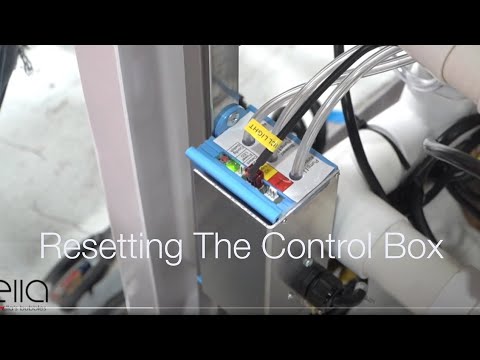
Chapters in this video
- 0:00 Disconnect Main Power Supply The video begins by showing how to disconnect the main power supply to the control box, and the green LED light goes out.
- 0:13 Disconnect All Function Connections The technician disconnects all function connections to the control box, recommending that each connection is marked before removal.
- 0:38 Disconnect Air and Water Pumps The technician disconnects all electrical connections to the air and water pumps that the tub may have.
- 0:59 Locate and Press Config Switch The technician locates the config switch on the control box and presses it until the green LED light cycles through its configuration process.
- 1:31 Reconnect Tub Components The technician reconnects all the tub's components, including the air and electrical lines, ensuring each is secured firmly.
- 1:49 Test All Tub Functions The technician tests all the tub's functions, including air, water, micro bubbles, and LED lights, to ensure they are working correctly.
Watch: Ella's Bubbles: Control Box Reset with chapters and a full transcript.

Chapters in this video
- 0:00 Introduction to Master Control Boxes The video introduces two master control boxes that manage the massage systems and heated seat in Ella's Bubbles walk-in tubs.
- 0:16 First Control Box Connections This section details the connections for the heater pads, air pump, water pump, and the main power input for the first control box.
- 0:41 Control Connectors and Switches The video explains where to connect the push buttons for the water pump, air blower, LED light, and the digital control keypad.
- 1:36 Second Master Control Box The second master control box is presented, showing its connections for the heated seat, air pump, water pump, and main power inlet.
- 1:55 20 Amp Power Connector The video highlights the 20 amp power connector for the second control box and explains how to identify its unique plug.
Watch: Master Control Box Explanation with chapters and a full transcript.
Related Guides
- How to Reset Your Walk-In Tub Control Box Step by Step
- Blue Control Box Has No Power Light, or the Air Pump Runs Constantly: Diagnosis, Replacement and Returning the Old Box
- Nothing Works After a Storm or Power Outage: Breaker, GFCI Under the Tub, the Control Box, and Why Motors Have No Reset Button
Related Videos

Chapters in this video
- 0:00 Chromotherapy Control Box Explained The video explains the chromotherapy control box, showing how to power it and connect the LED light and air switch.
- 0:29 Air Massage Control Box Explained The video explains the air massage control box, demonstrating how to power it and connect the air pump and air switch.
- 0:50 Air Massage Speeds And Auto Purge The video details the three speeds and wave function of the air massage, along with the auto Purge feature.
Common Questions
Does a solid green light mean the control box is fine?
Why did the jets, seat heater and light all stop at the same time?
Where is the GFCI outlet for my walk-in tub?
Does a replacement control box need a reset when it arrives?
How many blinks should I hold the configure button through?
What should I send when I open a ticket about the control box?
About this guide. Answers in the Ella’s Bubbles Support Center are compiled from real conversations with tub owners, our technicians’ notes and the product documentation, then reviewed by our team. Tub models and options have evolved over the years, so a detail here may differ slightly from your exact tub. If something looks different on yours, send us your serial number and a specialist will confirm it for your model.
Did this solve your question?
If not, open a ticket and our team will pick it up from here.
Open a Support Ticket Videos