


Which Control Panel Fits My Older Ella Tub and Does It Need Programming?
Updated October 2026
The replacement control panel for an older Ella tub is matched by the support team from your serial number and a photo of the side of the control box where the cables plug in, not from the age of the tub alone, and the published replacement steps are simply to unplug the old keypad at the control box and plug the new one in. Support tests every keypad before it ships so it arrives ready to connect, and no programming or pairing step appears anywhere in the published procedure. The ordering process is in Ordering a Replacement Electronic Keypad for Your Walk-In Tub, and this page covers how to work out which control and cable you have first.
First, Confirm What Kind of Control Your Tub Has
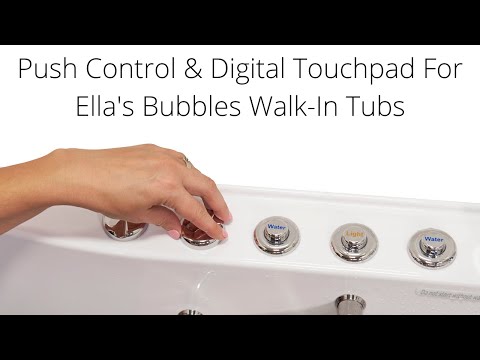
Ella tubs run their therapy systems in one of two ways. Many tubs use chrome push buttons on the deck with a separate intensity dial for the hydro jets. Others use the digital controller, also called the digital touchpad, digital control panel or keypad: a flat panel on the deck with a bubble icon that starts the air massage, plus and minus keys that set the speed, and a two-second hold on the icon to stop. The therapy systems underneath are the same on both. What Is the Digital Controller (Touchpad) on a Walk-In Tub? lists which models carry it as standard: the Shak, the Big4One and the whole two-seat family of Tub4Two, Companion, Escape and Big4Two. The Lounger's Air plus Hydro package is digital controller only, and on the Monaco the controller is an add-on.
The word panel causes confusion on its own. On an Ella tub it can mean the keypad on the deck, the removable end panel that covers the plumbing and frame at one end, or the front apron with its access panels. The video on this page shows the reversible end panel, the extension panel and the front apron with its two removable access panels, so you can see which parts those are. When you contact support about a control panel, say that you mean the keypad on the deck, because the team will confirm which part you mean before shipping anything.
Which Control Is on Your Deck
| Control type | What it looks like | What it runs | How a replacement is matched |
|---|---|---|---|
| Chrome push buttons with intensity dial | Pneumatic buttons on the deck plus a chrome dial | The therapy systems, with the dial setting hydro jet intensity | not listed; send a photo of the deck so support identifies the part |
| Digital controller (five-button electronic keypad) | Flat panel with a bubble icon and plus and minus keys | Air massage and speed, seat hydro pump, LED chromatherapy colors, and the foot jet pump on tubs with foot jets | Serial number plus a photo of the keypad and of the side of the blue control box where the cables plug in |
| Heat keypad on two-seat tubs with heated seats | A separate keypad for each seat | Seat heat only, independent of the digital controller | Say which seat is affected; an unresponsive heated seat has its own guide |
What this means for an older tub: the keypad is matched to the control box it plugs into, so the photo of the control box connections matters more than the tub's model year. Hydro jet intensity is still set with the chrome dial on the deck even on digital tubs, so a dial that still works tells you nothing about the keypad.
Identifying the Controller Cable
The keypad cable runs under the deck to the control box under the tub, and it plugs into the display connector on that box. There is no separate list of cable types to choose from. The photo of the side of the blue control box where the cables plug in is how support confirms that the replacement keypad and its cable are compatible with your tub. Before you assume the panel has failed, check that cable, because a cable that has slipped down behind the tub or a plug that has worked loose looks exactly like a dead keypad.
- Switch power to the tub off at the breaker before touching any connection.
- Open the magnetic access panel next to the door. The serial number is on the label behind it, so note it now.
- Find the blue control box and the display connector where the keypad cable plugs in. Confirm the plug is fully seated.
- Photograph the keypad on the deck and the side of the control box where the cables plug in.
- Restore power and test. Reseating a loose plug may restore function on its own. If the connection is sound and the buttons still misbehave, the keypad itself needs replacing.
Does the New Panel Need Programming?
The published installation of a replacement keypad has no programming or pairing step. The steps are: have power to the tub switched off at the breaker, open the access panel, unplug the old keypad cable from the control box, route the new cable so it cannot fall back under the tub, plug it in, secure the cable so it stays put, then restore power. Support tests the new keypad before shipping so it arrives ready to connect, and a touchpad that has genuinely failed is replaced as a single part without any of the pumps coming out. A local licensed electrician or your installer makes the connection.
If the new keypad does not respond after it is connected, the first checks are the same as for the old one: confirm the cable is seated at the display connector on the control box and follow the control box reset guide. For a ticket, note which icons respond and which do not.
What to Send the Team
- Your serial number from the label behind the magnetic access panel next to the door, and your order details from where you purchased.
- A photo of the keypad itself and a photo of the side of the blue control box where the cables plug in.
- The symptoms, such as buttons that respond only some of the time, indicator lights that do not come on, or a system that switches on and off on its own, and a note on whether the cable was checked.
- If only one side of a two-seat tub is affected, say so, because that points to a different cause than the keypad.
Electronic controls are among the parts covered by the Lifetime Limited Warranty, parts only, and support verifies the claim before a keypad ships. Under the parts warranty the keypad ships to the original customer's address without charge. If the part is not covered, support explains your options before anything ships. Older tubs raise the same fit question for other parts: on some earlier models the current front apron is not an exact fit, which is why photos and a measurement are requested, as explained in Ordering a Replacement Front Apron: Fit, Freight Shipping and Tracking. Open a ticket at ellasbubbles.com/support or call (800) 480-6850.

Chapters in this video
- 0:00 Reversible End Panel Included Every Ella walk-in tub includes one reversible end panel that can be placed on either side of the tub.
- 0:36 Extension Panel for Tubs Ella walk-in tubs under 60 inches long come with an extension panel to fit a standard 60-inch alcove.
- 1:08 Removable Front Apron Ella walk-in tubs feature a removable front apron with access panels for plumbing and component service.
- 1:30 Removing Panels Before Moving All removable panels must be taken off before the walk-in tub is moved into the house and bathroom.
Watch: Ella's Bubbles: Understanding Extension and End Panels with chapters and a full transcript.
Related Guides
- What Is the Control Box on a Walk-In Tub?
- Blue Control Box Has No Power Light, or the Air Pump Runs Constantly: Diagnosis, Replacement and Returning the Old Box
- How to Reset Your Walk-In Tub Control Box Step by Step
Related Videos

Chapters in this video
- 0:00 Replacing Your Digital Touchpad This video explains how to replace an Ella's Bubbles walk-in tub digital touchpad.
- 0:12 Removing the Old Touchpad The technician carefully cuts the seal around the old pad and pries it away from the tub.
- 0:44 Connecting the New Touchpad The technician connects the new touchpad and temporarily reconnects power to test its function.
- 1:03 Installing and Sealing the Touchpad The technician removes the backing from the tape, sets the new unit in place, and seals the edges with silicone.
Chapters in this video
- 0:00 Push Controls Versus Digital Touchpad Ella's Bubbles walk-in tubs offer a choice between on/off push controls and a digital touchpad for easy bathing.
- 0:45 Controlling Air Massage With Touchpad The air bubble icon on the digital touchpad activates the air massage, with plus and minus buttons adjusting intensity.
- 1:21 Chromo Therapy Light Functions Chromo therapy light functions the same with both control types, cycling through colors or selecting a specific one.
Common Questions
Does the replacement keypad need to be programmed or paired?
How do I know which keypad fits my older tub?
Do I need to identify the controller cable separately?
Is the control panel the same thing as the end panel?
Who installs the replacement keypad on my tub?
Is a replacement keypad covered by the warranty?
About this guide. Answers in the Ella’s Bubbles Support Center are compiled from real conversations with tub owners, our technicians’ notes and the product documentation, then reviewed by our team. Tub models and options have evolved over the years, so a detail here may differ slightly from your exact tub. If something looks different on yours, send us your serial number and a specialist will confirm it for your model.
Did this solve your question?
If not, open a ticket and our team will pick it up from here.
Open a Support Ticket Videos