


Blue Control Box Has No Power Light, or the Air Pump Runs Constantly: Diagnosis, Replacement and Returning the Old Box
Updated September 2026
If the blue control box shows no power light even though the wall outlet tests fine, and the pumps come on when you plug them straight into that outlet, the control box itself is the most likely cause. The same is true when the air pump runs the whole time the tub has power. In both cases the remedy is a replacement box, which Ella's Bubbles tests and configures before it ships, together with a return label so the original box can be examined. This article walks through the checks the team will ask you to make first, what the swap involves, and what the master control box actually does.
Diagnose in This Order
Every Ella's Bubbles control box has a green LED that lights when power is reaching the box. Work through these steps before assuming the box is bad, because the team will ask about each of them:
- Green LED. With the tub's dedicated GFCI outlet live, look for the green power light on the box. If the outlet tests good and the light stays dark, note that for your ticket. If the outlet itself is dead, start with the breaker and GFCI article.
- Pump direct to the outlet. Unplug a pump from the box and plug it straight into the same outlet. If the pump runs, power is fine and the box is not passing it through. Tell the team whether you used the same circuit for this test.
- Air hose at the button and at the box. Push-button tubs send an air signal from the chrome button through a small hose to a nipple on the box. Confirm the hose is firmly seated at both ends. A loose hose mimics a dead box; push-button air hoses and ports shows which nipple each hose belongs on.
- Power cord fully seated. Check that the box's power cord and the pump cords are pushed all the way in at the box.
- Air pump plug location. If the air pump never shuts off, check whether it is plugged into the female plug on top of the blue box or directly into the wall outlet. A pump plugged into the wall will run continuously by design; a pump plugged into the box that never stops points to the box.
One thing the team will also ask: is the pump truly staying on whenever the tub has power, or is it running only after a bath? A burst of air about 20 minutes after the air pump is switched off is the automatic purge cycle, which runs for about two minutes and is completely normal.
What a Replacement Box Involves
Replacement boxes are tested and configured at Ella's Bubbles before they go out, so you can skip the configuration step shown in the reset video. The team will ask one question so the right box is prepared: does your tub have chrome push buttons with air hose connections, or the digital control pad with an electrical connection?
- The swap is mechanical, not technical. The old box is disconnected and removed, and the new box is connected in its place. It is just the power cords, the air hoses and the light wire. Mark each hose and cord before you pull it so everything goes back to the same port.
- A return label is included. Please do not discard the old box. The team includes a return label so the defective unit can be diagnosed, and may ask for the tub's serial and model number or the original order reference so the details can be shared with the box's manufacturer. What happens after a warranty part is approved covers testing, shipping and the return.
- Some tubs need a specific reset count. A few configurations require the box to be reset so the green light blinks three times when the box is plugged in rather than four. If a box behaves oddly after connection, tell the team the blink count you set, and try swapping the air and water hoses at the box, since those two nipples are easy to reverse.
- You can keep bathing while you wait. If the air pump is the part misbehaving, unplug the air pump from the control box and the hydro massage can still be used normally.
The published warranty covers the part, not labor. If you would like a plumber, electrician or handyman to make the swap, that is arranged locally, and the team is happy to talk them through it by phone while they are on site. Parts, labor and free lifetime tech support explains how that works.
A Tour of the Master Control Box

Chapters in this video
- 0:00 Introduction to Master Control Boxes The video introduces two master control boxes that manage the massage systems and heated seat in Ella's Bubbles walk-in tubs.
- 0:16 First Control Box Connections This section details the connections for the heater pads, air pump, water pump, and the main power input for the first control box.
- 0:41 Control Connectors and Switches The video explains where to connect the push buttons for the water pump, air blower, LED light, and the digital control keypad.
- 1:36 Second Master Control Box The second master control box is presented, showing its connections for the heated seat, air pump, water pump, and main power inlet.
- 1:55 20 Amp Power Connector The video highlights the 20 amp power connector for the second control box and explains how to identify its unique plug.
Watch: Master Control Box Explanation with chapters and a full transcript.
This video shows two master control boxes, so called because they run the massage systems and the heated seat together. The presenter points out each port: the connectors for the heater pads, the air pump and the water pump, the power input, three small air-tube nipples for the push-button switches (water pump, air blower and LED light), a display port for the digital keypad on tubs that use one instead of push buttons, a separate connector for the LED chromatherapy light, and the config switch that programs the box. The green light glows once power is flowing. The first box has a standard three-prong 15 amp plug; the second has a true 20 amp plug with one vertical and one horizontal blade, which needs a 20 amp receptacle.

Chapters in this video
- 0:00 Troubleshooting Massager Malfunctions The technician explains that a common problem with massagers not working is an unplugged pump or component.
- 0:27 Checking Pump Power Connections The technician advises checking the pump and its power cord to ensure it is properly powered up.
- 0:42 Verifying Control Box Power The technician shows how to check the control box for a green light indicator, which means power is flowing to it.
Here the presenter uses an Ultimate with three pumps to show a common cause of one massage system not working. The control box runs the air and water pumps, while the third pump is powered with the in-line heater on its own line, so this tub needs two circuits. If one massage is dead, check that its pump and cord are plugged in and powered. If the whole tub is dead, look at the green light on the control box first. Which cord plugs where maps every cord and box for each package.
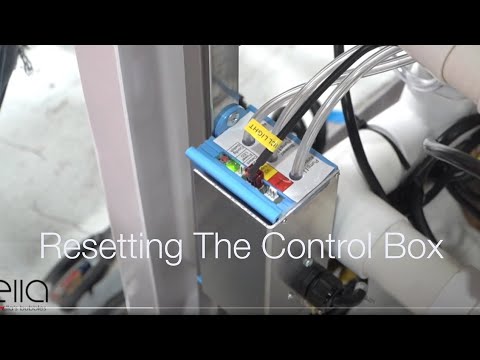
Chapters in this video
- 0:00 Disconnect Main Power Supply The video begins by showing how to disconnect the main power supply to the control box, and the green LED light goes out.
- 0:13 Disconnect All Function Connections The technician disconnects all function connections to the control box, recommending that each connection is marked before removal.
- 0:38 Disconnect Air and Water Pumps The technician disconnects all electrical connections to the air and water pumps that the tub may have.
- 0:59 Locate and Press Config Switch The technician locates the config switch on the control box and presses it until the green LED light cycles through its configuration process.
- 1:31 Reconnect Tub Components The technician reconnects all the tub's components, including the air and electrical lines, ensuring each is secured firmly.
- 1:49 Test All Tub Functions The technician tests all the tub's functions, including air, water, micro bubbles, and LED lights, to ensure they are working correctly.
Watch: Ella's Bubbles: Control Box Reset with chapters and a full transcript.
This is the reset procedure the team may reference. Disconnect the main power supply and confirm the green LED goes out. Mark every connection, then disconnect the air tubes with a firm twist and pull, and remove the electrical plugs slowly to protect the pins. Reconnect power, hold the config button through its blink cycle, and reconnect every line to its labeled port. When a replacement box arrives already configured, you only need the disconnect and reconnect portion. The full walkthrough with blink counts is in the control box reset guide.
Push Buttons Versus the Digital Pad
Chrome push buttons are pneumatic: pressing one sends a puff of air down a tube to the box, so a loose tube or a trapped air lock can make a button seem dead. The digital touchpad connects electrically through the display port instead. Which one your tub has is the most useful detail to include in your ticket, with a photo of the box and its label. If the box has power but a single button or pump does not respond, touchpad and push control troubleshooting and pump not working cover the relay, the air lock and the pump itself.
Related Guides
- Is the Replacement Air Blower the Right One for My Tub? How to Confirm the Match
- Pump Shuts Off After a Few Minutes Without Tripping the Breaker: The 20-Minute Timer, Overheating, and Isolating Each Pump
- Burning or Hot Plastic Smell From Your Walk-In Tub: Isolating the Pump or Control Box
- Control Box Configure Button: How Many Blinks, the One-Blink Reset, and the In-Line Heater Box
- A Terminal Screw on the Electrical Connection Bar Was Loose and Sparked: Is the Tub Still Safe?
- Heated Seat Not Warming Up: What to Check First and Which Parts Support Ships
Common Questions
The control box has no LED but the pump runs when plugged into the wall. What does that mean?
The air pump stays on whenever the tub has power. Why?
Are replacement control boxes pre-configured before they ship?
Do I have to send the old box back?
Can I still use the hydro jets while I wait?
The green light flashes when I plug the box in. Is that normal?
Do I need an electrician to swap the box?
For anything specific to your model, serial number or configuration, please open a ticket at ellasbubbles.com/support or call (800) 480-6850. The team is glad to help.
About this guide. Answers in the Ella’s Bubbles Support Center are compiled from real conversations with tub owners, our technicians’ notes and the product documentation, then reviewed by our team. Tub models and options have evolved over the years, so a detail here may differ slightly from your exact tub. If something looks different on yours, send us your serial number and a specialist will confirm it for your model.
Did this solve your question?
If not, open a ticket and our team will pick it up from here.
Open a Support Ticket Videos