


Should I Reset the Control Box After Replacing a Pump, Touchpad or Heater?
Updated October 2026
Not as a routine step. The published Ella guides treat the control box reset as a troubleshooting move for when a function does not respond, or when the box behaves oddly after a repair, rather than as a required part of every pump, touchpad or heater swap. The touchpad replacement sequence in Why Isn't My Digital Control Pad Lighting Up? goes straight from connecting the new pad to testing it, and the reset only enters the picture when a test fails. The practical rule is simple: put every line back on the box exactly where it came from, restore power, test each function, and run the reset only if something does not respond.
What the Reset Actually Does
The reset is a reconfiguration of the box itself. The first video on this page shows the whole sequence: the main power is disconnected so the green LED goes out, every tube and electrical connection is removed from the box, the pump connections are unplugged, power is restored, and the config button is held until the green LED cycles through its blink pattern. At the end of that process the narrator describes the box as reset and ready to be reconnected to all of the tub's components. In other words, the reset makes the box relearn what is attached to it.
The guides mention the reset in three situations: a touchpad that has stopped responding, a box that dropped its configuration when the jets stopped mid bath, and a blower that will not shut off. None of those is caused by fitting a new part. What a new part does require is that its lines go back onto the box correctly, because the purge guide notes that a reset done with the wrong blink count, or with the air and water hoses swapped on the box, leaves the box behaving oddly after a repair. Marking every line before anything comes off is the step that prevents that.
After Replacing the Touchpad
The digital touchpad plugs into the display connector on the control box and performs the same functions chrome push buttons would. Replacing it is a single-part job, and none of the pumps need to come out to do it. The published sequence is to cut the silicone seal, lift the old pad, connect the new one, test it, then set it on its tape and reseal the edges with white silicone. The test comes before the pad is sealed down, so you know it works before the silicone cures.
Testing is straightforward because the backlight on the pad stays on whenever the control box has power. Touch the bubble icon to start the air massage, step the speed with the plus and minus keys, and hold the icon for two seconds to stop it. Start and stop the seat hydro pump, cycle the LED colors and, on tubs with foot jets, switch the foot jet pump on and off. What Is the Digital Controller (Touchpad) on a Walk-In Tub? lists which models carry the pad and which icons it drives.
If the new pad stays dark, the pad is not the first suspect. Remove the front access panel and look at the green power LED on the master control box. No light with a live outlet means the power path is the problem. With the LED lit, find the display port and reseat the pad's plug, pushing firmly for a good connection and handling the connector slowly to protect the pins. Only if the pad is still dark after that do you run the reset.
After Replacing a Pump or the In-Line Heater
The reset video itself unplugs the air and water pumps and plugs them back in after the box is configured, so a pump swap is, from the box's point of view, the same reconnect-and-test the video ends with. Two details matter. First, the air pump must be plugged into the outlet on top of the blue control box, not into the wall outlet. A pump on the wall runs continuously by design, and that is the most common reason a blower never stops after a repair. Second, the air lines and the water lines must go back to the ports they came from. The purge guide specifically names swapped air and water hoses as a cause of odd behavior after a repair.
On tubs built with separate gray and blue boxes, the second video shows where each connection lands. The air massage box takes its power on the three-prong connector, the air pump on the three-pin connection, and the push button air switch on the nipple, and it gives the three speeds plus the wave setting and the Auto Purge. The chromatherapy box powers up the same way, with the LED light on its three pins and its own air switch. Neither box is shown needing anything beyond reconnection.
The in-line heater has no switch of its own. It runs only while the hydro pump runs and stops the moment the hydro stops, as How Do I Turn the Jets Off in an Emergency? explains. That means the test after a heater replacement is simply to run the hydro massage and confirm the heater comes on with it. If the heater or the jets turn off on their own mid bath after the work, that is a ticket rather than a reset.
Ella ships replacement parts under the warranty and does not send technicians. A local licensed electrician or plumber does the labor, and the labeled-line discipline in the video is what keeps that job clean.
Running the Reset When a Function Does Not Respond
If a function still does nothing after the lines are back on and power is restored, follow the sequence shown in the reset video.
- Disconnect the main power supply to the box. The green LED power light goes out.
- Mark every connection, then disconnect all function connections from the box. Grasp each tube firmly, twist and pull. Remove electrical connections slowly and carefully to avoid damaging any pins.
- Disconnect the electrical connections to any air and water pumps the tub has.
- Reconnect the main power. The green LED flashes four times and then stays a solid green.
- Press and hold the config button until the green LED cycles through its configuration process: it blinks once, then twice, three times and finally four times. Release the button. The LED blinks four times, turns off, and goes solid green.
- Using the labeled lines, reattach the air lines and the electrical lines, making sure each is secured firmly, then reconnect all air and hydro pumps.
- Test every function the tub has: air, water, microbubbles and the LED lights. Repeat the entire process if the reset is not successful.
One thing to expect after the air test: the Auto Purge will start on its own about 20 minutes after the air pump is switched off and run for 120 seconds. It cannot be stopped and it is normal, as Can I Stop the Air Blower Turning On After My Bath? describes. A blower that runs past that, or purges twice in the same hour, is the box failing to shut the pump off. Cut power at the breaker and see Why Won't My Tub Stop Purging?.
When the Box Itself Is the Problem
If the blower still runs constantly after the reset, or the green LED never goes solid, the box is the fault rather than the part you replaced. A control box that will not reset is a warranty part, and electronic controls, including the touchpad and the control box, are covered under the Lifetime Limited Warranty on supporting equipment. Leave the breaker off, and keep the old box for the return label that comes with the replacement.
For the ticket at ellasbubbles.com/support or (800) 480-6850, have your model and serial number, a photo of the control box showing the LED, a note on whether your tub has chrome push buttons or the digital keypad, the blink count you set during the reset, and which part was replaced. To remove all power from the tub while you work, switch off its dedicated GFCI breakers at the panel; the tub runs on its own circuits, so nothing else in the house goes dark.
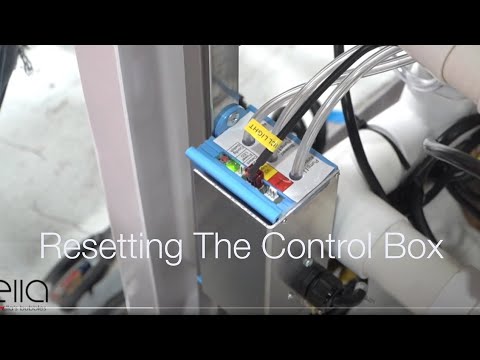
Chapters in this video
- 0:00 Disconnect Main Power Supply The video begins by showing how to disconnect the main power supply to the control box, and the green LED light goes out.
- 0:13 Disconnect All Function Connections The technician disconnects all function connections to the control box, recommending that each connection is marked before removal.
- 0:38 Disconnect Air and Water Pumps The technician disconnects all electrical connections to the air and water pumps that the tub may have.
- 0:59 Locate and Press Config Switch The technician locates the config switch on the control box and presses it until the green LED light cycles through its configuration process.
- 1:31 Reconnect Tub Components The technician reconnects all the tub's components, including the air and electrical lines, ensuring each is secured firmly.
- 1:49 Test All Tub Functions The technician tests all the tub's functions, including air, water, micro bubbles, and LED lights, to ensure they are working correctly.
Watch: Ella's Bubbles: Control Box Reset with chapters and a full transcript.

Chapters in this video
- 0:00 Chromotherapy Control Box Explained The video explains the chromotherapy control box, showing how to power it and connect the LED light and air switch.
- 0:29 Air Massage Control Box Explained The video explains the air massage control box, demonstrating how to power it and connect the air pump and air switch.
- 0:50 Air Massage Speeds And Auto Purge The video details the three speeds and wave function of the air massage, along with the auto Purge feature.
Watch: Gray and Blue Control Box Explanations with chapters and a full transcript.
Related Guides
- Blue Control Box Has No Power Light, or the Air Pump Runs Constantly: Diagnosis, Replacement and Returning the Old Box
- Why do my tub motors cycle on and off with no green LED?
- Nothing Works After a Storm or Power Outage: Breaker, GFCI Under the Tub, the Control Box, and Why Motors Have No Reset Button
Related Videos

Chapters in this video
- 0:00 Replacing Your Digital Touchpad This video explains how to replace an Ella's Bubbles walk-in tub digital touchpad.
- 0:12 Removing the Old Touchpad The technician carefully cuts the seal around the old pad and pries it away from the tub.
- 0:44 Connecting the New Touchpad The technician connects the new touchpad and temporarily reconnects power to test its function.
- 1:03 Installing and Sealing the Touchpad The technician removes the backing from the tape, sets the new unit in place, and seals the edges with silicone.
Common Questions
Does a new touchpad need to be configured before it works?
Why does my air pump run constantly after I replaced it?
Does the in-line heater have its own reset or switch?
Is the blast of air after the reset test a fault?
What if the green LED never goes solid after the reset?
About this guide. Answers in the Ella’s Bubbles Support Center are compiled from real conversations with tub owners, our technicians’ notes and the product documentation, then reviewed by our team. Tub models and options have evolved over the years, so a detail here may differ slightly from your exact tub. If something looks different on yours, send us your serial number and a specialist will confirm it for your model.
Did this solve your question?
If not, open a ticket and our team will pick it up from here.
Open a Support Ticket Videos