


Walk-In Tub with Push Controls & Digital Touchpad for Easy, Effortless Bathing | Ella’s Bubbles
Chapters in this video
- 0:00 Push Controls Versus Digital Touchpad Ella's Bubbles walk-in tubs offer a choice between on/off push controls and a digital touchpad for easy bathing.
- 0:45 Controlling Air Massage With Touchpad The air bubble icon on the digital touchpad activates the air massage, with plus and minus buttons adjusting intensity.
- 1:21 Chromo Therapy Light Functions Chromo therapy light functions the same with both control types, cycling through colors or selecting a specific one.
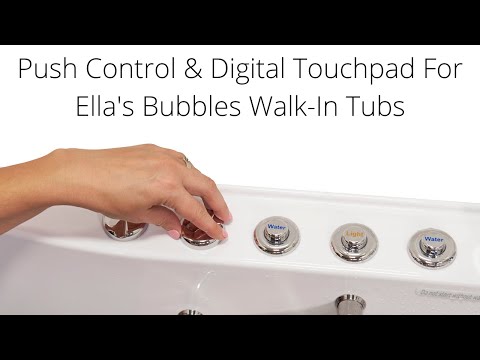
Ella's Bubbles walk-in tubs offer a choice between on/off push controls and a digital touchpad for easy bathing. This video demonstrates how to operate the air massage, hydro massage, and chromatherapy light functions on both control types.
Ella's Bubbles walk-in tubs come with either on/off push controls or a digital touchpad. The push controls require a gentle push to activate the air massage, cycling through high, medium, and low speeds before turning off. The hydro massage starts with one touch of the water button, and its intensity is adjusted with a control dial.
To control the air massage on the digital touchpad, touch the air bubble icon once to activate, then use the plus and minus buttons to adjust intensity. Holding the air bubble icon down for two seconds turns it off. The hydro massage is activated by pressing the hydro button once, with intensity adjusted by the control dial. Pressing the hydro button again shuts it off.
Chromo therapy light functions the same with both push button and digital touchpad controls. Pressing the button once cycles through the full range of colors, and a single press selects a specific color. Holding the button for two seconds turns the light off.
- On/off push controls
- Digital touchpad
- Air massage activation and intensity
- Hydro massage activation and intensity
- Chromo therapy light functions
Step by step help for this topic: Push Button Controls vs the Digital Touchpad: Operating Every Deck Control, Common Questions About Operating Your Walk-In Tub and Why Does My Air Massage Stay on One Speed?.
Video transcript1 paragraph · 1:50
ellis bubble's walk-in tubs come with a choice of deck controls on off push controls or the digital touchpad the on off push controls require a gentle push to activate to start the air massage touch the air button once for high speed push a second time for medium speed a third time for low speed and a fourth time to shut off the hydra massage starts with one touch of the water button jet stream intensity is controlled with the intensity control dial turning the dial up introduces more air into the jet stream for a stronger flow turning it down reduces the amount of air into the stream creating a more gentle flow to control the air massage on the digital touchpad touch the air bubble icon once to activate to increase the intensity touch the plus button to decrease the intensity touch the minus button to turn off hold the air bubble icon down for two seconds to activate the hydra massage on the digital touchpad simply press the hydra button once intensity of the hydra massage is adjusted with the intensity control dial to shut off the hydro massage push the hydro button once again light chromo therapy functions the same with push button or digital touchpad press the button once for the full range of colors repeating a single press selects a specific color finally hold for two seconds to turn the light off
Guides that use this video
- 📖Why Water Runs Over the Back of the Tub When the Jets Are OnDépannage et réparations
- 📖Why Won't My Ella Digital Touchpad Respond When I Press a Button?Dépannage et réparations
- 📖Why does a deck push button do nothing on my walk-in tub?Dépannage et réparations
- 📖Why Did My Walk-In Tub Jets Shut Off in the Middle of a Bath?Dépannage et réparations
- 📖Why Does a Deck Push Button Do Nothing on My Walk-In Tub?Dépannage et réparations
- 📖Why Does a Deck Push Button Do Nothing on My Walk-In Tub?Dépannage et réparations
- 📖Air jets will not shut off: which pump and button do I check?Dépannage et réparations
- 📖Why does my chromatherapy light flicker or skip some colors?Dépannage et réparations
- 📖How does the intensity dial work and why are my jets weak?Dépannage et réparations
- 📖How Do I Clean Air and Jet Push Buttons That Stick?Dépannage et réparations
- 📖Which Control Panel Fits My Older Ella Tub and Does It Need Programming?Pièces de rechange
- 📖How Do I Clean the Air Jet Bubble Lines in My Walk-In Tub?Entretien et nettoyage
- 📖How Do You Clean the Air Bubble Lines in a Jetted Walk-In Tub?Entretien et nettoyage
- 📖Can You Use Epsom Salts in an Air Jet Walk-In Tub?Entretien et nettoyage
- 📖Push Button Controls vs the Digital Touchpad: Operating Every Deck ControlThérapies et fonctionnement
- 📖How to Take a Bath in Your Walk-In Tub: The Sequence From Stepping In to Stepping OutThérapies et fonctionnement
- 📖Every Therapy and Control Video in One Place: Air, Hydro, Foot Massage, Microbubble, Heated Seat, Lights and ControlsThérapies et fonctionnement
- 📖Common Questions About Operating Your Walk-In TubThérapies et fonctionnement
- 📖Why Does My Air Massage Stay on One Speed?Thérapies et fonctionnement
- 📖What Does This Button on My Walk-In Tub Do?Thérapies et fonctionnement
- 📖Digital Keypad or Push Buttons: Which Therapies It Controls and Which Is Easier to UseThérapies et fonctionnement
- 📖Can the Chromatherapy LED Light Be Left Off a Walk-In Tub Order?Thérapies et fonctionnement
- 📖Can I Use My Jetted Ella Walk-In Tub as a Plain Soaking Tub With the Jets Off?Thérapies et fonctionnement
- 📖What Is a Bubble Tub and How Does Air Massage Work?Thérapies et fonctionnement
- 📖Are Ella Walk-In Tub Controls Clearly Labeled and Easy to Use?Thérapies et fonctionnement
- 📖Can I Stop the Air Blower Turning On After My Bath?Thérapies et fonctionnement
- 📖What is a therapeutic bath in a walk-in tub?Thérapies et fonctionnement
- 📖Which Ella walk-in tub has the strongest jet massage pressure?Thérapies et fonctionnement
- 📖What Is an Air Bath Tub and How Do Air Jets Work?Thérapies et fonctionnement
- 📖Can I upgrade my Ella walk-in tub from push buttons to a digital touchpad?Thérapies et fonctionnement
- 📖What Does Each Icon on the Ella Digital Touchpad Mean and Do?Thérapies et fonctionnement
- 📖What Is Air Massage Therapy in a Walk-In Tub and How Does It Work?Thérapies et fonctionnement
- 📖Can I Upgrade My Ella Walk-In Tub From Push Buttons to a Digital Touchpad?Thérapies et fonctionnement
- 📖What is a bubble tub and how do the air jets work?Thérapies et fonctionnement
- 📖How Do I Use Every Function on the Ella Digital Control Panel?Thérapies et fonctionnement
- 📖What Is an Air Bath or Air Tub and How Does It Work?Thérapies et fonctionnement
- 📖Can I move a push button to a different spot on the tub deck?Thérapies et fonctionnement
- 📖What is an air tub and how does air bath therapy work?Thérapies et fonctionnement
- 📖Is the digital control panel available on every Ella model and does it replace push buttons?Thérapies et fonctionnement
- 📖How do air and hydro massage differ, and why do some tubs skip air?Thérapies et fonctionnement
- 📖What Is the Difference Between an Air Bath and Whirlpool Hydro Jets?Thérapies et fonctionnement
- 📖Are Ella Walk-In Tub Controls Labeled and Reachable From a Wheelchair?Thérapies et fonctionnement
- 📖Can I upgrade my Ella walk-in tub from push buttons to a touchpad?Thérapies et fonctionnement
- 📖Do air or hydro therapy need an extra device, or just water?Thérapies et fonctionnement
- 📖Can I Get the Digital Touchpad With Hydro and Foot Massage Jets?Thérapies et fonctionnement
- 📖My Tub Was Supposed to Have an LED Light or Heated Seat, but There Is No SwitchCommande, expédition et livraison
More Therapies & Operation videos
 ▶0:27Walk-In Tub With Built-In Foot MassageAn Ella's Bubbles walk-in tub offers hydro foot jets for soothing relief and instant relaxation. This feature provides a home spa experience…Video page with transcript
 ▶1:16Best Walk-In Tub with Independent Foot Massage (Buyers Guide)Ella's Bubbles walk-in tubs offer independent foot massage and full body hydro massage for powerful therapy. This video explains how Ella's…3 chapters · used in 18 guides
 ▶2:26Hydrogen Therapy Walk-In Tubs by Ella - Why they are Worth Buying?Ella's Bubbles walk-in tubs with hydrogen therapy offer advanced therapeutic benefits. This system infuses bath water with molecular hydrogen…6 chapters · used in 10 guides
 ▶1:32Do Hydrogen Therapy Walk-In Tubs Really Work? Ella's Bubbles Puts It to the TestElla's Bubbles tests hydrogen levels in tap water and in a walk-in tub equipped with a hydrogen generator. The video demonstrates how dissolved…4 chapters · used in 10 guides
 ▶5:30Ultimate Walk-In Tub Guide: Ella's Bubbles ExplainedThe Ella Ultimate walk-in tub guide explains how to use its features, including safe entry, control buttons, filling the tub, independent foot…7 chapters · used in 13 guides
 ▶1:31Answering Your Most Common Question about Walk-In TubsCustomers often ask if they will get cold while a walk-in tub fills and drains. This video explains how Ella's Bubbles walk-in tubs address this…3 chapters · used in 10 guides
More Therapies & Operation videos → All videos → Watch on YouTube →
 Vidéos