


Push Button Controls vs the Digital Touchpad: Operating Every Deck Control
Updated October 2026
Ella walk-in tubs come with a choice of deck controls: on and off push button controls, or the digital touchpad. Both operate the same therapy systems, they just do it a little differently. With push controls, the air button cycles high, medium, low, off and the water button starts and stops the hydro pump; on the digital touchpad, the air bubble icon starts the air massage, plus and minus set the intensity, and a two second hold stops it. This article walks through operating the air massage, hydro massage, and chromatherapy light on each control type, which tubs come with which panel, plus the two habits that prevent most control problems.
Watch: Every Deck Control, Demonstrated
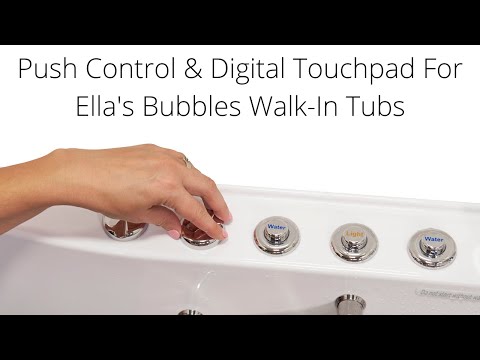
Chapters in this video
- 0:00 Push Controls Versus Digital Touchpad Ella's Bubbles walk-in tubs offer a choice between on/off push controls and a digital touchpad for easy bathing.
- 0:45 Controlling Air Massage With Touchpad The air bubble icon on the digital touchpad activates the air massage, with plus and minus buttons adjusting intensity.
- 1:21 Chromo Therapy Light Functions Chromo therapy light functions the same with both control types, cycling through colors or selecting a specific one.
The video demonstrates each function on both control types. The sections below summarize every step so you have them in writing. Watch: Walk-In Tub with Push Controls & Digital Touchpad for Easy, Effortless Bathing with chapters and a full transcript.

Chapters in this video
- 0:00 Introduction To Tub Controls Ella's Bubbles walk-in tubs offer a choice of deck controls: on/off push controls or a digital touchpad.
- 0:41 Using Digital Touchpad The video shows how to activate and adjust the air massage and hydro massage using the digital touchpad.
- 1:18 Operating Chromatherapy Lights The video explains how to operate the chromatherapy light function, which works the same for both push button and digital touchpad controls.
This second clip is a quick side-by-side of the push control and the digital controller, handy if you want to see the two panels next to each other before reading on.
Air Massage with Push Controls
The on and off push controls require only a gentle push to activate. The air massage button cycles through three speeds, starting on high:
- Press the air button once for high speed.
- Press a second time for medium speed.
- Press a third time for low speed.
- Press a fourth time to shut the system off.
Two tips that save a lot of tickets. First, press gently: a soft press with the palm of your hand works perfectly, and pressing very hard can damage the mechanism over time. Second, if the speeds ever feel reversed to you, that is not a fault. The button simply cycles high, medium, low, off, so count your presses from off and stop on the speed you prefer. Since the fourth press is always off, you can keep pressing to reach any speed or to shut down.
Air Massage on the Digital Touchpad
- Touch the air bubble icon once to activate the air massage.
- Touch the plus button to increase the intensity.
- Touch the minus button to decrease the intensity.
- Hold the air bubble icon down for two seconds to turn the air massage off.
Hydro Massage on Both Control Types
With push controls, the hydro massage starts with one touch of the water button, and another touch shuts it off. On the digital touchpad, simply press the hydro button once to start and once again to stop. On both control types, the strength of the jets is set by the intensity control dial on the deck: turning the dial up introduces more air into the jet stream for a stronger flow, and turning it down reduces the air for a gentler flow. Only start the hydro pump once the water is 2 inches above the highest jets. For a deeper look at how the two massage systems and their controls differ, see hydro massage vs air massage controls.

This clip shows the intensity dial in use. It is an air control on a hose rather than an electrical switch, which is why it works the same way on push button and touchpad tubs alike.
Chromatherapy Light on Both Control Types
Light chromatherapy functions the same with push buttons or the digital touchpad. Press the light button once for the full range of cycling colors, repeat single presses to select a specific color, and hold the button for two seconds to turn the light off. Our chromatherapy lights guide covers the light in detail.
Which Tubs Come with Which Panel
Pneumatic push buttons are the standard control. The digital touchpad controller comes as standard on the ShaK, Big4One, the two-seat family and the Lounger Air plus Hydro package, and is available as an upgrade with Air plus Hydro packages on some other single-seat models. Even on touchpad tubs, the independent foot massage and the microbubble system keep their own push buttons. Control positions are set by the factory-drilled shell and cannot be moved to a wall; a tub with no control holes is a special order, as our article on what can and cannot be customized explains.
Unlabeled Buttons, Other Controls, and When Something Will Not Respond
- Some models ship with unlabeled push controls, which is normal. Identify each button by its function: the water button runs the hydro massage, the air button cycles the air speeds, the micro button runs microbubble therapy if equipped, and the light button runs the chromatherapy LED.
- The optional heated seat and backrest has its own control, covered in our article on the heated seat and backrest.
- Tubs with independent foot massage have a separate foot button and a second intensity dial.
- If a button or the touchpad stops responding, the cause is usually a loose pneumatic tube or a power issue rather than a failed control. Start with our guide to touchpad and push control troubleshooting, then the control box reset.

Chapters in this video
- 0:00 Replacing Your Digital Touchpad This video explains how to replace an Ella's Bubbles walk-in tub digital touchpad.
- 0:12 Removing the Old Touchpad The technician carefully cuts the seal around the old pad and pries it away from the tub.
- 0:44 Connecting the New Touchpad The technician connects the new touchpad and temporarily reconnects power to test its function.
- 1:03 Installing and Sealing the Touchpad The technician removes the backing from the tape, sets the new unit in place, and seals the edges with silicone.
If a touchpad ever needs replacing, this video shows the job: protect the tub surface, cut the silicone seal around the old pad and pry it away with a straight edge, disconnect its plug, connect the new pad firmly and test it, then peel the backing from the two-sided tape, press the new pad in place and seal the edges with white silicone. Watch: Ella's Bubbles: Digital Touchpad Replacement with chapters and a full transcript.
Related Guides
- What Is Chromatherapy (LED Light) on a Walk-In Tub?
- Digital Keypad or Push Buttons: Which Therapies It Controls and Which Is Easier to Use
- What are the different types of Ella walk-in tubs?
- What Does Each Icon on the Ella Digital Touchpad Mean and Do?
- How Do I Use Every Function on the Ella Digital Control Panel?
- How Is the Heated Backrest Attached, and Can It Come Loose?
Common Questions
My push buttons have no labels. Which is which?
Which tubs come with the digital controller as standard?
Can I get the digital pad on a tub that lists only push buttons?
Can the digital pad be turned off so the lights go out?
What is the sixth button with a flame on it?
Are the buttons hard to press for someone with arthritis?
Why does the air seem to skip a speed?
Is there a floating remote?
Can the controls be relocated to the wall?
The digital pad will not light up at all.
The buttons feel soft and loose. Is that normal?
What are the plus and minus keys for on the digital pad?
Still need help? Our team is always happy to assist. Open a ticket at ellasbubbles.com/support or call (800) 480-6850.
About this guide. Answers in the Ella’s Bubbles Support Center are compiled from real conversations with tub owners, our technicians’ notes and the product documentation, then reviewed by our team. Tub models and options have evolved over the years, so a detail here may differ slightly from your exact tub. If something looks different on yours, send us your serial number and a specialist will confirm it for your model.
Did this solve your question?
If not, open a ticket and our team will pick it up from here.
Open a Support Ticket Videos