


What Does Each Icon on the Ella Digital Touchpad Mean and Do?
Updated October 2026
The Ella digital touchpad has a short set of icons, and each one runs a single therapy: the air bubble icon starts the air massage, the plus and minus keys set its intensity, the hydro button starts and stops the hydro jets, and the light button runs the LED chromatherapy. On tubs built with them, the panel also turns the foot jet pump on and off and runs the heated seat. Every gesture is demonstrated on both control types in Push Button Controls vs the Digital Touchpad: Operating Every Deck Control, and the sections below take the panel one icon at a time.
Before You Touch Anything
Two things about the panel are easy to mistake for a fault. The backlight stays on all the time whenever the tub has power, so a lit pad at midnight is normal. And a tub only has controls for the systems it was built with, so if your tub was ordered without air massage, the air icon has nothing to run. The touchpad plugs into the display connector on the control box and performs the same functions the push buttons would, which means the therapy systems underneath are identical to a push control tub.
Before you test any pump function, fill the tub until the water sits at least 1 inch above the highest jets. Never press a pump icon on a dry tub, because a dry run causes permanent damage that is not covered. The panel itself needs nothing more than a soft, damp cloth for cleaning.
The Air Bubble Icon, Plus and Minus
Touch the air bubble icon once to start the air massage. Touch plus to increase the intensity and minus to decrease it. To turn the air off, hold the air bubble icon down for two seconds. A quick tap will not stop it, and that two second hold is the step most often missed when an owner reports that the off command does nothing.
This is the biggest difference from push buttons. On push controls the air button cycles through three speeds starting on high: one press for high, a second for medium, a third for low and a fourth to shut off. On the touchpad there is no cycling, the icon simply starts the air and the plus and minus keys step the speed. Owners who move from one control type to the other often press the icon repeatedly out of habit, which is why why the air massage stays on one speed separates the two sequences.
The Hydro Button
Press the hydro button once to start the hydro massage and once again to stop it. That is the whole gesture. The strength of the jets is not set on the pad at all. The intensity control dial on the deck adjusts jet strength just as it does with push controls: turning the dial up introduces more air into the jet stream for a stronger flow, and turning it down reduces the amount of air in the stream for a gentler flow. So a bather who wants softer jets should reach for the chrome dial, not the panel.
On the two-seat family and the other models that carry the panel as standard, the hydro icon runs the seat hydro pump. The labeled push button equivalent is the Water button, and how Ella controls are labeled maps each marking on both control types.
The Light Button
Chromatherapy works the same way on the touchpad as on a push button. Press the light button once for the full range of cycling colors. Repeat a single press to select a specific color, and each further single press steps to the next solid color. Hold the button for two seconds to turn the light off. A light that seems stuck on one color has usually been locked there by a single press, and a light that will not shut off has not been held long enough. The video on this page shows all three light gestures alongside the air and hydro functions.
Foot Jets, Heated Seat and What Is Not on the Panel
The digital controller is standard on the Shak, the Big4One and the whole two-seat family: the Tub4Two, Companion, Escape and Big4Two. On those tubs it runs air, seat hydro and LED, plus foot jet on and off, so a foot jet icon will be present. On other builds the independent hydro foot massage keeps its own push button, and the microbubble system always keeps a separate push button of its own. An owner who taps around the pad looking for a microbubble icon will not find one, and that is not a fault. The full model list is in What Is the Digital Controller (Touchpad) on a Walk-In Tub?.
The heated seat is handled two ways. On tubs where the panel runs the heated seat, the heat icon turns it on and off. Two-seat tubs with heated seats carry a separate heat keypad for each seat, independent of the digital controller, so look beside the panel rather than on it. The Lounger's Air plus Hydro package is digital controller only, and on the Monaco the controller is an add-on that is not always shown on the published listing.
If an Icon Does Nothing
Check the gesture first, because a single touch starts a system and a two second hold stops it. Then confirm the tub has power at the breaker and the GFCI outlet, and look at the plug behind the pad and its cable to the master control box. A pad whose icons partly respond, or a pad that is dark with the tub powered, is worked through in why the digital touchpad will not respond. A touchpad that has genuinely failed is replaced as a single part without removing any pump. For a ticket at ellasbubbles.com/support or (800) 480-6850, have your model name, your order details from where you purchased, a photo of the panel and a note on which icons respond and which do not.
Related Guides
- Digital Keypad or Push Buttons: Which Therapies It Controls and Which Is Easier to Use
- What Is the Intensity Control Dial on a Walk-In Tub?
- Heated Seat and Back Not Warming Up: Checking the Control Box LED and the Button Prongs
- Can I Upgrade My Ella Walk-In Tub From Push Buttons to a Digital Touchpad?
- How Do I Use Every Function on the Ella Digital Control Panel?
- Is the digital control panel available on every Ella model and does it replace push buttons?
Related Videos
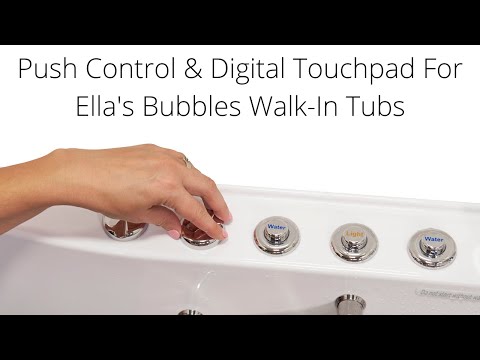
Chapters in this video
- 0:00 Push Controls Versus Digital Touchpad Ella's Bubbles walk-in tubs offer a choice between on/off push controls and a digital touchpad for easy bathing.
- 0:45 Controlling Air Massage With Touchpad The air bubble icon on the digital touchpad activates the air massage, with plus and minus buttons adjusting intensity.
- 1:21 Chromo Therapy Light Functions Chromo therapy light functions the same with both control types, cycling through colors or selecting a specific one.
Common Questions
How do I turn the air massage off on the digital touchpad?
Why does the touchpad have no way to set jet strength?
Is there a microbubble icon on the digital control panel?
Why does my digital touchpad stay lit all the time?
How do I lock the chromatherapy light on one color?
Which Ella tubs come with the digital touchpad as standard?
About this guide. Answers in the Ella’s Bubbles Support Center are compiled from real conversations with tub owners, our technicians’ notes and the product documentation, then reviewed by our team. Tub models and options have evolved over the years, so a detail here may differ slightly from your exact tub. If something looks different on yours, send us your serial number and a specialist will confirm it for your model.
Did this solve your question?
If not, open a ticket and our team will pick it up from here.
Open a Support Ticket Videos