


Can I Upgrade My Ella Walk-In Tub From Push Buttons to a Digital Touchpad?
Updated October 2026
In many cases yes, an Ella walk-in tub with push buttons can be fitted with a digital touchpad, but only if the tub has the right therapy package and a compatible control box. The digital control is available only on tubs with a combination of jetting systems, such as air plus hydro, and each control is matched to the control box on the tub. The physical work is described in Where Can the Digital Control Be Mounted and How Is It Installed?. This page answers the upgrade question itself: whether your tub qualifies, what changes, what stays on buttons, and whether the touchpad is the right choice for the bather.
Which Tubs Can Take the Touchpad
Two conditions decide whether the upgrade is possible.
- The therapy package. The digital keypad is offered only on tubs with a combination of jetting systems, for example air plus hydro. It cannot be fitted to a hydro-only tub, which uses push controls with an intensity dial. A hydro-only tub would need to move to a dual-jetting package first, so the touchpad is not a simple add-on for that tub. The limits are set out in Digital Keypad or Push Buttons: Which Therapies It Controls and Which Is Easier to Use.
- The control box. Digital controls are matched to the control box on the tub. The touchpad plugs into the display connector on the control box and performs the same functions the push buttons would. When you request a control, send a photo of the labeled side of the blue electrical box under the tub so the team can confirm the control is compatible with your system.
Each control is tested on a matching setup before it is packed, and you receive a tracking number once it ships. The therapy systems underneath stay exactly the same. The touchpad changes how you start and stop them, not what the tub can do.
What Moves to the Touchpad and What Stays Where It Is
Even on a fully loaded tub the touchpad does not control everything. Use the table to set your expectations before any cutting begins.
| Function | With a digital touchpad | What it means for you |
|---|---|---|
| Air massage | Bubble icon starts it, plus and minus keys set the speed, holding the icon for two seconds stops it | Finer control than the four press cycle on the Air button |
| Seat hydro massage | One press of the hydro icon starts it, one more press stops it | Works the same as the Water button |
| Hydro jet intensity | Still set with the chrome dial on the deck | The dial stays, so plan the layout around it |
| LED chromatherapy | Press once for the full range of colors, repeat a single press to select a color, hold for two seconds to turn off | Functions the same with push button or touchpad |
| Microbubble therapy | Keeps its own push button | One chrome button remains on the deck |
| Independent hydro foot massage | Keeps its own push button on a loaded build. On tubs where the touchpad is standard, the controller turns the foot jet pump on and off | Ask which applies to your control box before you order |
In practice the upgrade rarely clears every chrome button off the deck. The intensity dial remains, and separate systems such as microbubble keep their buttons. For a new build, the warehouse confirms which functions will be on the keypad and which on buttons before the build begins. Ask for the same confirmation on a retrofit. A full description of the panel is in What Is the Digital Controller (Touchpad) on a Walk-In Tub?.
What the Installation Involves
The digital control installation instructions are the same for every Ella tub model, whichever side the door is on. The control can be mounted in the deck where two push buttons currently sit, or in another spot on the tub. The team can send photos of the placement options taken on the same model as yours. Those photos sometimes show the door on the opposite side, so mirror the location as needed. Mounting in the deck follows this sequence:
- Remove the two push buttons where the control will go. The team has a video showing how to remove buttons from the top of the tub.
- Mark the opening to match the body of the control you received. The team can confirm the opening size and send the written instructions.
- Cut the opening with a router, then clean up the edges so the control slides in and sits flush.
- Dry fit the control, route its cable to the blue control box under the tub and plug it in.
- Run a bead of white kitchen and bath silicone sealant around the control and press it into the opening. Wipe away the excess and let the sealant cure before the tub is used.
The point to take seriously is that the opening cannot be undone. Talk through the placement with your installer before cutting. Ella's Bubbles does not send technicians, so a local installer does this work using the written instructions and photos the team supplies.
The touchpad replacement video is a good preview of the finished result. It shows a touchpad being lifted out of a deck, the plug on its cable being disconnected and reconnected with a firm push, and power being restored temporarily to confirm the new pad works before it is sealed. It then shows the pad pressed into place on its two-sided tape and all the edges sealed with white silicone.
Is the Touchpad the Right Choice for the Bather?
Before committing, think about who uses the tub. The standard push buttons are large and operated by a single press, so they can be pushed with the palm of the hand. The keypad's keys are smaller. That suits bathers who want finer control of the massage settings, but it is harder for someone who cannot see or press a small key accurately. For that reason push buttons are the recommended choice for a bather with limited hand strength, coordination or vision. In that situation the best upgrade may be no upgrade at all.
If reach is the concern rather than dexterity, the keypad can be installed on the front apron of the tub instead of the deck, so a seated bather can operate it without leaning. This is an added option to discuss with your Ella dealer or the team at (800) 480-6850.
How Daily Use Changes After the Upgrade
The push controls and touchpad video shows both systems side by side. With push buttons, the air massage runs high on the first press, medium on the second and low on the third, and the fourth press shuts it off. On the touchpad you touch the air bubble icon once to start, use plus to increase intensity and minus to decrease it, and hold the bubble icon for two seconds to turn it off. Hydro is one press on and one press off on either system, with jet strength still set by the intensity dial. Light chromatherapy functions the same either way. If you are still learning your current buttons, What Does This Button on My Walk-In Tub Do? is a helpful starting point before you decide.
What About Moving a Single Push Button to a New Spot?
The published guidance covers mounting the digital control in a new location, and it covers removing push buttons from the top of the tub. It does not describe a procedure for relocating an individual push button to another spot on the deck. Any new opening in the deck is permanent, so please do not drill or cut on a guess. Open a ticket at ellasbubbles.com/support or call (800) 480-6850 with your model and a photo of the deck, and ask what is possible for your tub.
How to Request the Upgrade
Contact your Ella dealer or the team at (800) 480-6850, or open a ticket at ellasbubbles.com/support. Have the following ready:
- your model name
- your order details from where you purchased
- the therapy systems on your tub
- a photo of the labeled side of the blue control box
Ask for the placement photos for your model, the opening size for the control and the written instructions, so your installer has everything before the first cut.

Chapters in this video
- 0:00 Replacing Your Digital Touchpad This video explains how to replace an Ella's Bubbles walk-in tub digital touchpad.
- 0:12 Removing the Old Touchpad The technician carefully cuts the seal around the old pad and pries it away from the tub.
- 0:44 Connecting the New Touchpad The technician connects the new touchpad and temporarily reconnects power to test its function.
- 1:03 Installing and Sealing the Touchpad The technician removes the backing from the tape, sets the new unit in place, and seals the edges with silicone.
Watch: Ella's Bubbles: Digital Touchpad Replacement with chapters and a full transcript.
Related Guides
- What Does Each Icon on the Ella Digital Touchpad Mean and Do?
- Why Won't My Ella Digital Touchpad Respond When I Press a Button?
- Ordering a Replacement Electronic Keypad for Your Walk-In Tub
- Can I move a push button to a different spot on the tub deck?
Related Videos
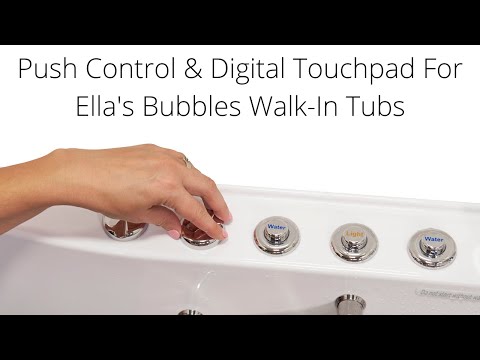
Chapters in this video
- 0:00 Push Controls Versus Digital Touchpad Ella's Bubbles walk-in tubs offer a choice between on/off push controls and a digital touchpad for easy bathing.
- 0:45 Controlling Air Massage With Touchpad The air bubble icon on the digital touchpad activates the air massage, with plus and minus buttons adjusting intensity.
- 1:21 Chromo Therapy Light Functions Chromo therapy light functions the same with both control types, cycling through colors or selecting a specific one.
Common Questions
Can a hydro-only walk-in tub be fitted with the digital touchpad?
Will the touchpad replace every push button on my tub?
How do I know the digital control will work with my tub?
Does the door side change how the digital control is installed?
Is the touchpad easier to use than push buttons for someone with arthritis?
Can the digital control go somewhere other than the tub deck?
About this guide. Answers in the Ella’s Bubbles Support Center are compiled from real conversations with tub owners, our technicians’ notes and the product documentation, then reviewed by our team. Tub models and options have evolved over the years, so a detail here may differ slightly from your exact tub. If something looks different on yours, send us your serial number and a specialist will confirm it for your model.
Did this solve your question?
If not, open a ticket and our team will pick it up from here.
Open a Support Ticket Videos