


Digital Keypad or Push Buttons: Which Therapies It Controls and Which Is Easier to Use
Updated September 2026
The digital keypad is available only on tubs ordered with a combination of jetting systems, such as air plus hydro. It cannot be fitted to a hydro-only tub. Even on a fully loaded tub the keypad does not control everything: microbubble therapy and the independent hydro foot massage keep their own push buttons, and the warehouse confirms which functions stay on buttons before the build begins. For bathers with limited vision or dexterity the standard push buttons are usually the better choice because they are larger and can be pressed with the palm of the hand.
What the Keypad Controls
On a dual-jetting tub the keypad runs the air massage and the hydro massage, with the functions described in what the digital controller does. Functions that are built as separate systems stay on their own push buttons. On a tub with air, hydro, hydro foot massage, and microbubble therapy, the keypad handles air and hydro while the hydro foot jets and the microbubble system each keep a push button. Microbubble therapy is a custom upgrade done in the warehouse. Before a loaded tub is built, the warehouse asks the team to confirm with you which functions will be on the keypad and which on buttons. What comes with each therapy package lists the controls included with each package.
When the Keypad Is Offered
- Only with a combination of jetting systems, for example air plus hydro. A hydro-only tub uses push controls with an intensity dial.
- On tubs with many options, the keypad may be the only practical way to fit all the controls, so the build will use the digital control pad.
If you want the keypad on a hydro-only tub, the tub would need to move to a dual-jetting package first. Review the therapy options and features with your Ella dealer or the team at (800) 480-6850 before deciding.
Push Buttons Versus Keypad for Limited Dexterity or Vision
The standard push buttons are large and operated by a single press, so they can be pushed with the palm of the hand. The keypad's keys are smaller, which suits bathers who want finer control of the massage settings but is harder for someone who cannot see or press a small key accurately. For that reason push buttons are the recommended choice for a bather with limited hand strength, coordination, or vision. If reach is the concern, the keypad can be installed on the front apron of the tub rather than the deck so a seated bather can operate it without leaning, and this is an added option with an additional charge. The heated seat and backrest is described in how the heated seat and backrest works.
How to Choose
- Pick the therapy package first. If it is hydro only, the choice is made for you: push controls.
- Think about who will use the tub. For limited dexterity or vision, choose push buttons unless a specific keypad feature is essential.
- If you choose the keypad on a loaded tub, expect microbubble and hydro foot to stay on push buttons, and confirm the layout when the team asks.
- If reach is the concern, ask about mounting the keypad on the front apron.
Related Guides
- Which Therapy Combinations Fit Which Tub: Hydro, Air, Microbubble, and Foot Massage by Model
- Push Button Controls vs the Digital Touchpad: Operating Every Deck Control
- Where Can the Digital Control Be Mounted and How Is It Installed?
- Are Ella Walk-In Tub Controls Clearly Labeled and Easy to Use?
- Can I upgrade my Ella walk-in tub from push buttons to a digital touchpad?
- What Does Each Icon on the Ella Digital Touchpad Mean and Do?
Related Videos
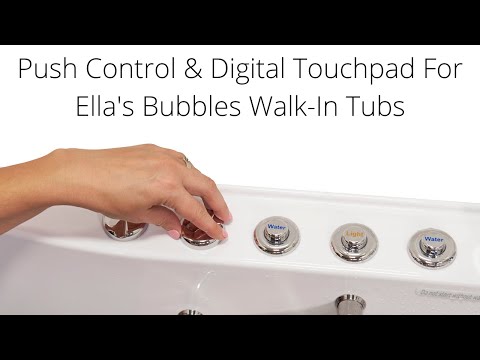
Chapters in this video
- 0:00 Push Controls Versus Digital Touchpad Ella's Bubbles walk-in tubs offer a choice between on/off push controls and a digital touchpad for easy bathing.
- 0:45 Controlling Air Massage With Touchpad The air bubble icon on the digital touchpad activates the air massage, with plus and minus buttons adjusting intensity.
- 1:21 Chromo Therapy Light Functions Chromo therapy light functions the same with both control types, cycling through colors or selecting a specific one.

Chapters in this video
- 0:00 Replacing Your Digital Touchpad This video explains how to replace an Ella's Bubbles walk-in tub digital touchpad.
- 0:12 Removing the Old Touchpad The technician carefully cuts the seal around the old pad and pries it away from the tub.
- 0:44 Connecting the New Touchpad The technician connects the new touchpad and temporarily reconnects power to test its function.
- 1:03 Installing and Sealing the Touchpad The technician removes the backing from the tape, sets the new unit in place, and seals the edges with silicone.
Common Questions
Can I get the digital keypad on a hydro-only tub?
Does the keypad control the microbubble therapy?
Are push buttons easier for someone with limited dexterity?
Can the keypad be placed on the front apron of the tub?
Will I still have push buttons if I order the keypad?
Still Need Help?
Open a ticket at ellasbubbles.com/support or call (800) 480-6850 and have your model and serial number ready.
About this guide. Answers in the Ella’s Bubbles Support Center are compiled from real conversations with tub owners, our technicians’ notes and the product documentation, then reviewed by our team. Tub models and options have evolved over the years, so a detail here may differ slightly from your exact tub. If something looks different on yours, send us your serial number and a specialist will confirm it for your model.
Did this solve your question?
If not, open a ticket and our team will pick it up from here.
Open a Support Ticket Videos