


My walk-in tub has power but nothing turns on, what do I check?
Updated October 2026
When your walk-in tub has power but nothing turns on, start at the GFCI outlet or breaker that feeds the tub, confirm the water is above the highest jets, and only then turn the power off and open the access panel to check the control box and the air tubes behind it. Ella deck buttons are pneumatic, so a button can look and feel perfectly fine while its puff of air never reaches the relay, and a tripped GFCI, a tube that has slipped off, or a pump cord in the wrong port explains most tubs that ran a few times and then went silent. Why Does a Deck Push Button Do Nothing on My Walk-In Tub? covers a single dead button; this page is for the tub where nothing at all responds.
Check the Power Path Before You Open Anything
A tub that worked the first two times and now does nothing has almost always lost power somewhere between the wall and the control box, not inside the tub. Work through these in order, because each one is quicker than the next.
- Reset the GFCI outlet or breaker that feeds the tub. A trip here is the most common reason a tub that was fine suddenly does nothing at all.
- Look for a second GFCI. Some installations have more than one GFCI-protected circuit, and the first thing technical support asks for after the wall GFCI checks out is the second one. A tripped second GFCI can leave the air system running while the hydro side is dead, or the other way around.
- Confirm the water level. Never press the Water button on a tub that is not filled above the highest jets, because a dry run causes permanent pump damage that is not covered. The air pump can run dry safely, so the Air button is a safe first test.
- Count your presses on the Air button. On the three-speed push control the first press is high, the second is medium, the third is low, and a fourth press turns the air off. A press that seems to do nothing may simply have moved the blower from high to medium.
Where the Control Box Is and How to Reach It Safely
Turn off the GFCI breaker that feeds the tub before you remove anything. The front apron carries a large removable access panel next to the door, and it is held on by magnets, so it pops loose when you grip the edge and pull by hand. There is no need to pry it with a knife or a screwdriver, and doing so can mark the apron. Behind the panel the control box is screwed to the frame. It is blue on most tubs and grey on some, and it has a small green power LED. The serial number label sits in the same opening, so note it now because support will ask for it.
The green LED is your first reading. If it is lit, power is reaching the box and the fault is downstream of it. If it is dark while the outlet is live, check that the box's own power cord is plugged into the dedicated GFCI outlet. One master box uses a standard three prong 15 amp plug and the other uses a 20 amp plug with one horizontal blade that needs a 20 amp receptacle. On a tub with a digital touchpad the pad's backlight stays on whenever the box has power, so a lit pad and a lit green LED together tell you the box is fed.
What you find behind the panel depends on the package. Tubs with a heated seat use a master control box with labeled ports for the heater pads, the air pump, the water pump and the power inlet, plus a separate air nipple for each deck button. Other packages use a separate box for each system: the chromatherapy box has a three prong power connection, three pins for the LED light and a nipple for the light button's tube, and the air massage box is laid out the same way with the air pump on its three pin connector and its own nipple for the air button's tube. The chromatherapy box runs on its own transformer, which is why the jets can run while the light is dead, as explained in Why Won't My Chromatherapy Light Turn On?.
Where the Air Tube Connects, and Why You May Not See One
Each chrome button on the deck is a small air pump. Pressing it squeezes a puff of air down a slim tube, red in the first video, to a nipple on the control box, where a relay clicks and switches the matching pump or light. There is no electricity at the button, which is why a gentle press with your palm is all it needs. The first video shows the red tube pushed onto the chromatherapy box and onto the air massage box, points out where power enters the box and where power leaves for the pump, and shows the locking nut at the button end that keeps the tube tight.
If you see no air tube at all, look at your controls. A tub with a digital touchpad has no pneumatic tube, because the pad connects to the master control box by a cable at the display port, so the check there is to reseat the keypad plug, pushing firmly and handling the connector slowly so the pins are not damaged. On a push button tub, a tube that is missing altogether or a fitting that has snapped off is a parts question: open a ticket at ellasbubbles.com/support with your serial number and a photo or short video of the control box, and the team can identify the part you need.
The first video also shows the one tube fault that produces the opposite symptom, a button stuck in the down position from an air lock. Pull the tube off the nipple at the control box, let the button pop up, push the tube firmly back on, and press again while listening for the click. A button stuck down keeps sending a run signal, which is one of the causes covered in Why Does the Pump Turn On as Soon as the Tub Is Plugged In?.
Listen for the Click and Sort the Fault into One of Two Groups
With power restored and the tub filled, press each button and listen at the control box. The click is the whole diagnosis.
- A click and the pump runs. The button, the tube and the relay are fine. If it ran only after the GFCI reset, the trip was the problem.
- A click but nothing runs. The air side is working and the fault is on the power side. Follow each pump cord to its end: the water pump and the air pump must plug into their labeled ports on the control box, never into a wall outlet or a splitter. Shut off power at the breaker and have your installer or a licensed electrician check the connections at the pump.
- No click. Either the puff of air is not arriving or the relay is not switching. Seat the tube firmly on its nipple at the box, tighten the locking nut at the button, and try again. If there is still no click, swap two air tubes at the box as a test. The swap routine is spelled out in Ozone (O3) Button Does Nothing: Checking the Relay Click, the Air Tube, and Swapping Relays to Test, and it works the same way for any pair of relays on the box.
- Air runs but hydro does not. The two systems have separate pumps and circuits, so one can run while the other sits silent. Air Jets Work but the Hydro Jets Will Not Turn On: What to Check walks through the hydro side, including the second GFCI and the push control hardware set that support can ship.
The Control Box Reset
If the LED is lit, every tube is seated, the cords are in the right ports and the tub still does nothing, reset the control box before assuming it has failed. The second video shows the full routine.
- Disconnect the main power supply to the box. The green LED goes out.
- Mark every tube and every plug so each goes back to the same port, then grasp each tube, twist and pull. Remove electrical connectors slowly to avoid damaging the pins.
- Disconnect the electrical connections to the air and water pumps.
- Reconnect the main power. The green LED flashes four times and then stays solid green.
- Press and hold the config switch on the box until the LED blinks once, then twice, then three times and then four times. Release it; the LED blinks four times, goes dark, then returns to solid green.
- Reconnect the air lines and electrical lines by their labels, reconnect the pumps, and test the air, water, microbubble and light functions one at a time. Repeat the whole process once if the first reset does not take.
What the Warranty Covers and Who Confirms It
Ella walk-in tubs carry a Lifetime Limited Warranty on parts, extended to the first purchaser at the original installation address. A relay, a control box or a pump that has genuinely failed ships to that address without charge after the defect is verified. Labor is not covered, and Ella does not send technicians, so a local licensed electrician does any work at the pump connections, and the installer who did your installation warrants that work. The support team is the only party that confirms coverage and matches the right part, and it needs your model, your serial number and photos or a short video of what happens when you press the button. Open a ticket at ellasbubbles.com/support or call (800) 480-6850 with that information once you have reset the GFCI, seated the tubes and listened for the click.

Chapters in this video
- 0:00 Pneumatic Push Button Controls The video introduces how push button controls work using pneumatic pressure and a red connection tube.
- 0:32 Activating the Relay Switch Pushing the button creates pneumatic pressure, which activates the relay switch inside the control box.
- 1:05 Relieving an Air Lock The video demonstrates how to relieve an air lock by disconnecting the red tube from the control box.
- 1:20 Reconnecting the Tube After reconnecting the tube, pushing the button should produce an audible clicking sound from the control box.
Watch: Push Button Control Issues and Repair with chapters and a full transcript.
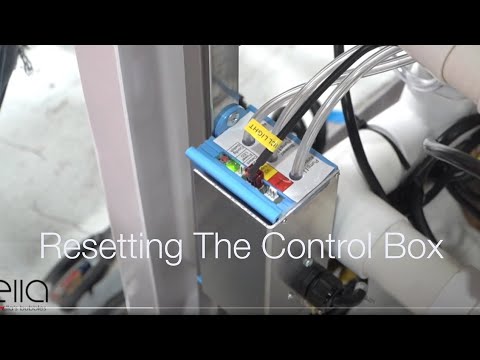
Chapters in this video
- 0:00 Disconnect Main Power Supply The video begins by showing how to disconnect the main power supply to the control box, and the green LED light goes out.
- 0:13 Disconnect All Function Connections The technician disconnects all function connections to the control box, recommending that each connection is marked before removal.
- 0:38 Disconnect Air and Water Pumps The technician disconnects all electrical connections to the air and water pumps that the tub may have.
- 0:59 Locate and Press Config Switch The technician locates the config switch on the control box and presses it until the green LED light cycles through its configuration process.
- 1:31 Reconnect Tub Components The technician reconnects all the tub's components, including the air and electrical lines, ensuring each is secured firmly.
- 1:49 Test All Tub Functions The technician tests all the tub's functions, including air, water, micro bubbles, and LED lights, to ensure they are working correctly.
Watch: Ella's Bubbles: Control Box Reset with chapters and a full transcript.
Related Guides
- Why Does a Deck Push Button Do Nothing on My Walk-In Tub?
- Blue Control Box Has No Power Light, or the Air Pump Runs Constantly: Diagnosis, Replacement and Returning the Old Box
- Pump or Blower Will Not Start When You Press the Button: Releasing an Air Lock at the Blue Control Box
Related Videos

Chapters in this video
- 0:00 Chromotherapy Control Box Explained The video explains the chromotherapy control box, showing how to power it and connect the LED light and air switch.
- 0:29 Air Massage Control Box Explained The video explains the air massage control box, demonstrating how to power it and connect the air pump and air switch.
- 0:50 Air Massage Speeds And Auto Purge The video details the three speeds and wave function of the air massage, along with the auto Purge feature.

Common Questions
Where is the control box on an Ella walk-in tub?
What does the green light on the control box mean?
Can I remove the access panel without turning off the power?
Why is there no air tube on my digital touchpad tub?
Does the lifetime warranty cover a failed relay or control box?
Is it safe to press the buttons on an empty tub?
About this guide. Answers in the Ella’s Bubbles Support Center are compiled from real conversations with tub owners, our technicians’ notes and the product documentation, then reviewed by our team. Tub models and options have evolved over the years, so a detail here may differ slightly from your exact tub. If something looks different on yours, send us your serial number and a specialist will confirm it for your model.
Did this solve your question?
If not, open a ticket and our team will pick it up from here.
Open a Support Ticket Videos