


Why Does a Deck Push Button Do Nothing on My Walk-In Tub?
Updated October 2026
A deck push button that does nothing is almost always an air signal problem, not an electrical fault at the button. Each chrome button sends a puff of air down a slim hose to the control box. A dead button usually means a hose has slipped off or a GFCI has tripped on that function's circuit. Less often, the pump or relay behind it is the cause. When only one button is affected, the fastest way to pin it down is One Push Button Does Nothing While the Others Work: The Breaker Check and the Hose Swap Test. This page puts that test in context with every other check, in the order that saves you the most time.
Why a Push Button Can Fail Without Being Broken
Ella push buttons are pneumatic. There is no electricity at the button itself. Pressing the button squeezes air down its tube to the control box, where a relay clicks and switches the matching pump or the light. The blue control box is screwed to the frame under the seat, and it has three 3/8 inch air hoses, three power plugs and a green LED. The port labels on the white face of the box tell you which hose belongs to which button. Airswitch Pump #1 is the water button, Blower/Airswitch Pump #2 is the air button, and Light Airswitch is the light button.
Because the signal is only air, a button can be in perfect condition while its hose has popped off at either end. That is good news, since the most common fix is pushing a hose back on. The basics of the system are described in What Are Push Controls (Easy-Touch Buttons) on a Walk-In Tub?.
Rule Out Normal Behavior Before You Open Anything
Several things look like a dead button and are not faults at all. Work through these with the tub filled.
- Test with water in the tub. Fill until the water sits at least 1 inch above the highest jets. Never press a pump button on a dry tub, because a dry run causes permanent damage that is not covered.
- Check that the tub has that system. A tub only has buttons for the therapies it was built with, and some Transfer and legacy tubs ship with unlabeled buttons, which is normal. Water is hydro, Air is air, Micro is microbubble and Light is the LED. The key is in What Does This Button on My Walk-In Tub Do?.
- The plain knob is a dial, not a switch. On a hydro tub the unlabeled knob is the intensity dial. It does nothing until the hydro pump is running.
- The air button steps through speeds. The first press is high speed, the second is medium, the third is low, and the fourth press turns the air massage off. A press that seems to do nothing may simply have changed the speed.
- The light button has three behaviors. One press starts the full range of colors, repeating a single press selects a specific color, and holding for two seconds turns the light off. The push controls video shows each of these presses on a working tub.
- Press gently. The buttons need only a gentle push with the palm of your hand. Pressing too hard can damage the internal mechanism.
Match the Pattern to the Likely Cause
- Nothing on the tub responds. This points to power, not to a button. Reset the dedicated breaker and the GFCI before anything else.
- One button is dead while the others work. The pumps are not all on the same circuit. The foot massage pump, for example, is on a separate breaker from the other pumps. The air jets and light can work while the foot jets are dead simply because one GFCI tripped. Reset the GFCI and breaker for that circuit, then move to the hose checks below.
- The button stays down after you press it. This is an air lock and not a broken part. Disconnect its tube at the control box so the button pops back up, then reconnect the tube.
- The tub is newly installed and its buttons do nothing. On the Standard and Zen platform the air pipe connection passes through the shell with a back nut. It must be tightened and verified working before the install is finalized, so a loose connection there is a common cause on a new tub.
- The ozone (O3) button is the dead one. Ozone tubs have two similar relays on the control box, one for the LED light and one for the ozone, so the two can be compared directly. The tube swap between them is covered in Ozone (O3) Button Does Nothing: Checking the Relay Click, the Air Tube, and Swapping Relays to Test.
Listen for the Relay Click
With the power on, press a button that works and note the faint click from the control box. Then press the dead button and listen for the same sound. A click means the relay is switching, so the air signal is arriving and the problem lies further along. No click means the air signal is not reaching the relay, and the usual reason is a tube that is not plugged firmly. This one observation is also the most useful detail you can give the support team, so make a note of it.
Secure the Hose at Both Ends
Turn off the GFCI breaker that feeds the tub before handling connections. The large access panel is held on by magnets, and a butter knife slipped behind the edge will pry it loose. Find the blue control box and trace the hose from the dead button's port.
The connections video shows this repair from start to finish. In it, a technician explains that when one massage does not work, most of the time there is no connection between the push control and the control box. Either the air tube is not connected or the tube is faulty. The video then shows both ends being secured:
- At the control box. Plug the tube firmly onto the nipple, twisting and pushing at the same time so it seats fully.
- At the button, remove the cap. Slip a fine flat screwdriver under the button cap, use a second one if needed, and work your way around until the cap pries off.
- Reach the connection. Pull out the black part behind the cap. This exposes the lock nut and the hose.
- Reconnect and reassemble. If the hose is off, connect it and secure it. Push the black part back into the housing, then refit the button and the chrome ring that holds it in place.
Restore power, fill the tub above the jets if you are testing a pump button, and press the button again while listening for the click.
Use the Hose Swap Test to Find the Faulty Side
If the hose is seated at both ends and the button is still dead, swap two hoses at the control box. Pull the hose off the port for the dead button and the hose off the Light Airswitch port, then plug each into the other port. Press the Light button, which should now start the pump that belongs to the dead button. Press the dead button, which should now turn on the LED light. Return both hoses to their original ports when you finish.
- If the light button runs the pump but the dead button still does not light the LED, the problem is on the button side. It is either the button itself or the hose between the button and the box.
- If the dead button lights the LED but the light button does not start the pump, the button and hose are fine. The problem is the pump, its plug into the box, or the box.
One caution matters here. The water pump must never run dry. If the water pump starts during the test, press the button again immediately, or fill the tub above the jets before you begin. The air pump can run dry safely.
When to Open a Ticket and What to Include
If the checks above do not bring the button back, open a ticket at ellasbubbles.com/support or call your Ella dealer or the team at (800) 480-6850. Include the following:
- your model name
- your order details from where you purchased
- which button is affected
- whether you hear a click from the control box when you press it
- the result of the hose swap test, which tells the team exactly which part to send
Replacement parts ship under the warranty, and a local licensed plumber or electrician does the labor. If the opposite ever happens and a control will not stop its function, How Do I Turn the Jets Off in an Emergency? explains how to remove all power at the tub's dedicated GFCI breakers.

Chapters in this video
- 0:00 Understanding Air Signal Connections The technician explains how the push control sends an air signal to the control box via an air tube.
- 0:51 Securing Control Box Connections The technician demonstrates how to firmly plug the air tube onto the nipple of the control box.
- 1:03 Checking The Button Connection The technician shows how to retrieve the button from its housing using a flat screwdriver.
- 1:21 Securing The Pump Connection The technician pulls out the black pump part and secures the connection with the lock nut and hose.
- 1:40 Reassembling The Button The technician puts the pump and button back in place, securing it with the chrome ring.
Watch: How to Secure Air & Hydro Connections in Your Walk-In Tub | Ellas Bubbles with chapters and a full transcript.
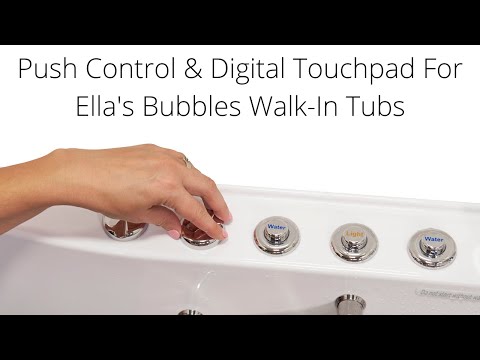
Chapters in this video
- 0:00 Push Controls Versus Digital Touchpad Ella's Bubbles walk-in tubs offer a choice between on/off push controls and a digital touchpad for easy bathing.
- 0:45 Controlling Air Massage With Touchpad The air bubble icon on the digital touchpad activates the air massage, with plus and minus buttons adjusting intensity.
- 1:21 Chromo Therapy Light Functions Chromo therapy light functions the same with both control types, cycling through colors or selecting a specific one.
Watch: Walk-In Tub with Push Controls & Digital Touchpad for Easy, Effortless Bathing | Ella’s Bubbles with chapters and a full transcript.
Related Guides
- How Do I Reset My Ella Walk-In Tub After a Power Outage or GFCI Trip?
- Control Box Has Power but Nothing Turns On: Where the Air Tube Connects
- My walk-in tub has power but nothing turns on, what do I check?
- Can I move a push button to a different spot on the tub deck?
Related Videos

Chapters in this video
- 0:00 Pneumatic Push Button Controls The video introduces how push button controls work using pneumatic pressure and a red connection tube.
- 0:32 Activating the Relay Switch Pushing the button creates pneumatic pressure, which activates the relay switch inside the control box.
- 1:05 Relieving an Air Lock The video demonstrates how to relieve an air lock by disconnecting the red tube from the control box.
- 1:20 Reconnecting the Tube After reconnecting the tube, pushing the button should produce an audible clicking sound from the control box.
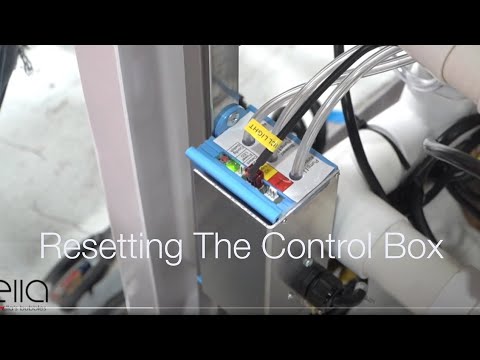
Chapters in this video
- 0:00 Disconnect Main Power Supply The video begins by showing how to disconnect the main power supply to the control box, and the green LED light goes out.
- 0:13 Disconnect All Function Connections The technician disconnects all function connections to the control box, recommending that each connection is marked before removal.
- 0:38 Disconnect Air and Water Pumps The technician disconnects all electrical connections to the air and water pumps that the tub may have.
- 0:59 Locate and Press Config Switch The technician locates the config switch on the control box and presses it until the green LED light cycles through its configuration process.
- 1:31 Reconnect Tub Components The technician reconnects all the tub's components, including the air and electrical lines, ensuring each is secured firmly.
- 1:49 Test All Tub Functions The technician tests all the tub's functions, including air, water, micro bubbles, and LED lights, to ensure they are working correctly.
Common Questions
Is there electricity at the push button on the tub deck?
What does it mean if I hear no click when I press the button?
Why does my push button stay down after I press it?
Why do the air jets and light work while the foot jets do nothing?
Can I run the hose swap test with the tub empty?
Why do the buttons on my newly installed tub do nothing?
About this guide. Answers in the Ella’s Bubbles Support Center are compiled from real conversations with tub owners, our technicians’ notes and the product documentation, then reviewed by our team. Tub models and options have evolved over the years, so a detail here may differ slightly from your exact tub. If something looks different on yours, send us your serial number and a specialist will confirm it for your model.
Did this solve your question?
If not, open a ticket and our team will pick it up from here.
Open a Support Ticket Videos