


Are Ella Walk-In Tub Controls Labeled and Reachable From a Wheelchair?
Yes on labeling: the push controls on the deck of an Ella walk-in tub are marked by function, with an Air button for the air massage, a Water button for the hydro jets, a Light button for the chromatherapy light and a dial for jet intensity, and the digital touchpad uses an air bubble icon, a hydro button and plus and minus keys, as explained in Are Ella Walk-In Tub Controls Clearly Labeled and Easy to Use?. On reach, the controls sit on the tub deck beside the drain openers and the faucet rather than on a wall, and the Transfer family pairs that deck with an extra wide L-shaped outward swing door that leaves room for a wheelchair beside the tub. If reach from a seated position is the concern, ask about having the digital keypad mounted on the front apron instead of the deck.
Where the Controls Sit on a Transfer Tub
The Transfer family (Transfer26, Transfer30, Transfer32, Transfer60 and TransferXXL) is the Ella line built for wheelchair transfer, and its brochure prints a labeled callout diagram drawn on a Transfer30 with the Air plus Hydro option. The deck callouts on that diagram are the items a seated bather reaches for, and Where Everything Is on a Transfer Tub: The Brochure Callout Diagram Explained matches each label to the part. On the deck you will find:
- A deck-mounted chrome stainless steel grab bar, with a second wall-mounted grab bar also included.
- Two drain openers, cable operated with extended handles, one for each floor drain.
- The intensity dial, printed as the foot massage intensity control on the diagram, which adds or reduces air in the hydro stream.
- Three push controls, printed Air, Light and Water, for air jets on and off, the LED light on and off, and hydro jets on and off.
- The 5-piece fast-fill faucet: spout, hot water switch, diverter, cold water switch and the pull-out adjustable hand mixer with 5 water pressure modes.
The push controls and the dial sit next to the drain openers and the faucet, so everything you operate during a bath is grouped on the deck. The Transfer30 spec sheet lists one intensity dial on the Hydro Massage package and two on the Hydro plus Hydro Independent Foot Massage package, so a foot massage tub has a second dial on the deck. A Hydro-only or Hydro plus Microbubble tub will not have every control pictured, but the deck, drain, faucet and door callouts apply to all five models. Because the position of the buttons relative to the seat differs by model and package, ask the team at (800) 480-6850 to go over where the controls sit relative to the seat on the model you are considering before you order.
What Each Labeled Control Does Once You Reach It
The buttons need only a gentle push, which matters when grip is limited as well as reach.
- Air. One press starts the air massage on high speed, a second press drops it to medium, a third press to low, and a fourth press turns the air massage off.
- Water. One touch starts the hydro massage, and the strength of the jets is set with the intensity dial. Turning the dial up introduces more air into the jet stream for a stronger flow, and turning it down gives a gentler flow.
- Light. Press once for the full range of colors, repeat a single press to settle on a specific color, and hold for two seconds to turn the light off. The light works the same way on the push control and on the touchpad.
On the digital touchpad, touch the air bubble icon once to start the air massage, use the plus button to increase intensity and the minus button to decrease it, and hold the air bubble icon for two seconds to turn it off. Press the hydro button once to start the hydro massage and once more to stop it, with the intensity dial still setting the jet strength. For limited dexterity or vision, push buttons are usually the easier choice because each button does one job. If reach is the issue rather than dexterity, the digital keypad is the version to ask about mounting on the front apron, which brings the keypad to the face of the tub.
The Door and Seat That Make a Transfer Tub Work from a Wheelchair
Reach begins with getting onto the seat. The two Transfer videos on this page show the extra wide L-shaped outward swing door that leaves room for a wheelchair beside the tub so a bather can move across onto the seat. The Transfer26 video shows the smallest member of the family, a tub for smaller bathers that measures 52 inches long by 26 inches wide with a 19 inch seat width, a low step-in entry height and a warm soft-touch acrylic surface that eases entry for a wheelchair user; it includes an 8 inch extension panel for a 60 inch alcove. The TransferXXL video (the model name is TransferXXL; the older spelling in the video title refers to the same tub) shows the largest Transfer tub, with a 29 inch seat width, an 18 inch seat length and 48 inches of interior length, plus deck and sidewall grab bars for support during the transfer. Both videos show the intensity control dial on the deck being used to set the hydro massage level to the bather's comfort.
If the Buttons on Your Tub Have No Symbols
Some older Transfer units shipped with push controls that have no symbols. If yours are blank, identify each button by function: press it and see whether the air, the hydro jets or the light responds, then note which is which. The brochure callout diagram gives the usual layout to compare against. Behind the apron, each push button connects to the control box by a thin air tube, so an installer can also trace a button to its port on the control box if there is any doubt about which button is which.
What the Controls Mean for Your Electrician
Choosing push buttons over a touchpad, or asking about an apron-mounted keypad, does not change the tub's electrical plan. Ella labels every power cord at the factory, and each labeled cord needs its own dedicated 20 amp, 120 volt GFCI protected circuit that shares nothing with another appliance, as laid out in What Electrical Wiring and Breaker Does an Ella Walk-In Tub Need?. One line covers hydro only, air only or hydro plus air; two lines cover hydro plus microbubble, hydro plus foot massage and the heated seat variants. A Transfer tub ordered with the independent foot massage, the package with two intensity dials, is therefore a two line tub, and that is the count to give your electrician before rough-in.
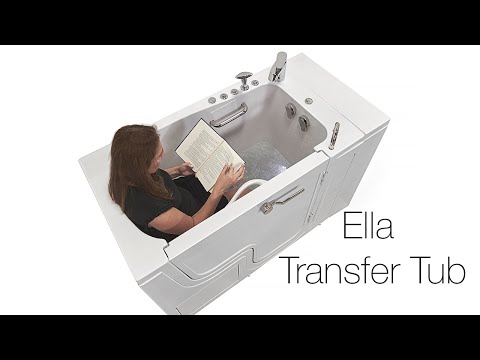

Watch: XXXL Transfer Walk-In Tub with L-Shaped Door: Ideal for Seniors & Wheelchair Users | Ella’s Bubbles with chapters and a full transcript.
Related Guides
- Your Transfer Tub Owner's Manual, Section by Section, Plus the Legacy Transfer Operations Sheet (Transfer26, 30, 32, 60, XXL)
- Wheelchair Transfer Tubs Compared: Transfer26, Transfer30, Transfer32, Transfer60, and TransferXXL
- Why Don't the Pins on My L-Shape Transfer Door Line Up?
Related Videos



Common Questions
Are the push buttons on an Ella walk-in tub labeled by function?
Can the controls be placed where a seated bather can reach them more easily?
Which Ella walk-in tubs are built for wheelchair users?
Why does my Transfer tub have two intensity dials on the deck?
How do I turn the air massage down or off with the push button?
About this guide. Answers in the Ella’s Bubbles Support Center are compiled from real conversations with tub owners, our technicians’ notes and the product documentation, then reviewed by our team. Tub models and options have evolved over the years, so a detail here may differ slightly from your exact tub. If something looks different on yours, send us your serial number and a specialist will confirm it for your model.
Did this solve your question?
If not, open a ticket and our team will pick it up from here.
Open a Support Ticket Videos