


Are Ella Walk-In Tub Controls Clearly Labeled and Easy to Use?
Updated September 2026
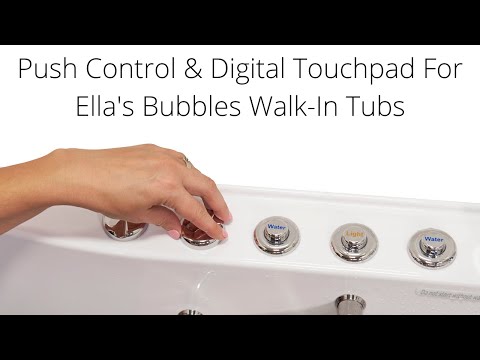
Yes. Ella's push controls on the tub deck are labeled by function, with an "Air" button for the air massage, a "Water" button for the hydro jets, a "Light" button for the chromatherapy light and a dial for jet intensity, and the digital touchpad uses an air bubble icon, a hydro button and plus and minus keys. The Transfer brochure callout diagram explained shows where each of these sits on the deck of the Transfer models built for wheelchair users. One exception to know about: some older Transfer units shipped with push controls that have no symbols, and those are identified by what each button does.
What Each Labeled Control Does
Ella tubs come with a choice of deck controls, either on and off push controls or the digital touchpad. The video on this page demonstrates both. With push controls, the buttons require only a gentle push:
- Air. Touch once for high speed, a second time for medium, a third time for low and a fourth time to shut the air massage off.
- Water. One touch starts the hydro massage. The strength of the jets is set with the intensity dial, and turning the dial up introduces more air into the jet stream for a stronger flow, while turning it down gives a gentler flow.
- Light. Press once for the full range of colors, repeat a single press to settle on a specific color, and hold for two seconds to turn the light off. The light works the same way on the push control and on the touchpad.
How the Digital Touchpad Is Marked
On the touchpad, touch the air bubble icon once to start the air massage, use the plus button to increase intensity and the minus button to decrease it, and hold the air bubble icon for two seconds to turn it off. Press the hydro button once to start the hydro massage and once again to stop it, with the intensity dial adjusting the jet strength just as it does with push controls.
If Your Push Buttons Have No Symbols
The older Transfer operations sheet notes that some units come without symbols on their push controls. If yours are blank, identify each button by function: press it and see whether the air, the hydro jets or the light responds, then note which is which. The brochure callout diagram gives the usual layout to compare against. Behind the apron, each push button connects to the control box by a thin air tube, so an installer can also trace a button to its port using Which Cord Plugs Where: Identifying Control Boxes, Cords, and Air Tubes After Installation.
Choosing a Tub as a Wheelchair User
The Transfer family is the Ella line built for wheelchair transfer. The Transfer video on this page shows its extra wide L-shaped outward swing door, which is designed for easy access especially for wheelchair users, along with a low threshold, a textured floor, a two-latch gear and shaft lock, deck-mounted and wall-mounted grab bars and a soft grip door handle. The L-shaped opening also leaves convenient space for a wheelchair beside the tub. The push controls and intensity dial are mounted on the deck, and on the Transfer30 diagram they sit alongside the drain openers and faucet. For where the controls fall relative to the seat on the specific model you are considering, ask your Ella dealer or the team at (800) 480-6850, who can go over the deck layout with you.
Chapters in this video
- 0:00 Push Controls Versus Digital Touchpad Ella's Bubbles walk-in tubs offer a choice between on/off push controls and a digital touchpad for easy bathing.
- 0:45 Controlling Air Massage With Touchpad The air bubble icon on the digital touchpad activates the air massage, with plus and minus buttons adjusting intensity.
- 1:21 Chromo Therapy Light Functions Chromo therapy light functions the same with both control types, cycling through colors or selecting a specific one.
Watch: Walk-In Tub with Push Controls & Digital Touchpad for Easy, Effortless Bathing | Ellau2019s Bubbles with chapters and a full transcript.

Chapters in this video
- 0:00 Ella Transfer Walk-In Tub Features The video introduces the Ella acrylic Transfer walk-in tub, highlighting its L-shaped door, low threshold, textured floor, and secure two-latch gear and shaft lock.
- 0:45 Tub Sizes and Soaking Depth The video details the two available sizes of the Transfer tub, including seat dimensions and interior length, and explains how soaking depth is determined.
- 1:57 Air and Hydro Massage Systems The tub's air massage with auto purge and hydro massage with an inline heater are showcased, along with strategic foot jets and ozone sterilization.
- 2:38 Dual Drain and Fast-Fill Faucet The video explains the best-in-class dual drain technology for quick draining and presents the five-piece fast-fill faucet set with a hand shower.
- 3:00 MicroBubble and Chromatherapy Options The Infusion MicroBubble option for skin softening is presented, along with the heated seat and backrest, and the dual massage package with chromatherapy.
Watch: Wheelchair Accessible Transfer Walk-In Tubs in 30x52 & 32x52 Sizes | Ellau2019s Bubbles with chapters and a full transcript.
Related Guides
- Every Therapy and Control Video in One Place: Air, Hydro, Foot Massage, Microbubble, Heated Seat, Lights and Controls
- Digital Keypad or Push Buttons: Which Therapies It Controls and Which Is Easier to Use
- Why Won't My Ella Digital Touchpad Respond When I Press a Button?
- What Does Each Icon on the Ella Digital Touchpad Mean and Do?
Common Questions
Are the push buttons on an Ella walk-in tub labeled?
What do I do if my push controls have no symbols?
How do I turn the air massage off with push controls?
Is the digital touchpad marked with icons?
Which Ella tub is designed for a wheelchair user?
Where are the controls located on the tub?
About this guide. Answers in the Ella’s Bubbles Support Center are compiled from real conversations with tub owners, our technicians’ notes and the product documentation, then reviewed by our team. Tub models and options have evolved over the years, so a detail here may differ slightly from your exact tub. If something looks different on yours, send us your serial number and a specialist will confirm it for your model.
Did this solve your question?
If not, open a ticket and our team will pick it up from here.
Open a Support Ticket Videos