


What Does This Button on My Walk-In Tub Do?
Updated September 2026
If you are wondering what a button on your walk-in tub does, you are in good company, because some Transfer and legacy tubs ship with unlabeled push buttons and that is normal. Here is the quick key: Water is the hydro pump, Air is the three speed air massage, Micro is the microbubble system, Light is the LED chromatherapy, and the button with a flame on it is the heated seat. The plain knob with no label on a hydro tub is the intensity dial that regulates jet pressure. The first thing to check is which therapy package your tub was built with, because a tub only has buttons for the systems it contains, which is why you may have a Water button but no Air button. The full walkthrough lives in push controls versus the digital touchpad.
Likely Causes
- The tub shipped with unlabeled push buttons, which is normal on Transfer and some legacy models.
- The tub has only the therapies that were ordered, so a missing Air or Micro button simply means that system is not on the tub.
- The plain dial is the hydro intensity control, not a switch, so it does nothing until the hydro pump is running.
What to Check, in Order
- Fill the tub until the water sits at least 1 inch above the highest jets. Never press a pump button on a dry tub, because a dry run causes permanent damage that is not covered.
- Press each button once with the tub filled and watch what responds. Stirring water is Water (hydro), fine bubbles from the small holes is Air, a milky cloud is Micro, a glow inside the tub is Light, and warmth on the seat after 10 to 15 minutes is the flame button.
- Learn the air speeds. Press Air once for high, twice for medium, three times for low, and a fourth time to turn it off. Press gently with your palm, since pressing too hard can damage the mechanism. More in hydro massage versus air massage controls.
- With the Water button on, turn the plain dial to raise or lower jet pressure.
- Master the LED. Press once to cycle colors, keep pressing to lock a solid color, and press and hold to turn it off.
- If you have a digital panel, it runs air, LED, back hydro and the heated seat; foot massage and microbubble keep their own separate push buttons. The panel backlight stays on all the time, which is normal.
- Match everything to manuals, spec sheets and drawings by model and operating common questions.
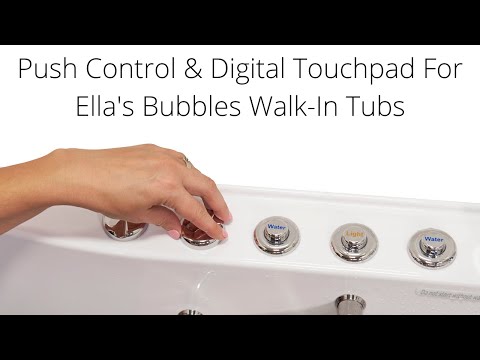
Chapters in this video
- 0:00 Push Controls Versus Digital Touchpad Ella's Bubbles walk-in tubs offer a choice between on/off push controls and a digital touchpad for easy bathing.
- 0:45 Controlling Air Massage With Touchpad The air bubble icon on the digital touchpad activates the air massage, with plus and minus buttons adjusting intensity.
- 1:21 Chromo Therapy Light Functions Chromo therapy light functions the same with both control types, cycling through colors or selecting a specific one.
The video shows the air button pressed once for high, twice for medium, three times for low and a fourth time for off, hydro started with a single touch and set with the dial, and the touchpad icons held for two seconds to stop. Watch: Walk-In Tub with Push Controls & Digital Touchpad for Easy, Effortless Bathing with chapters and a full transcript.
When to Open a Ticket
If a button does nothing with the tub properly filled, or you cannot tell which package your tub has, send a clear photo of the control cluster and your order details to your Ella dealer or the team at ellasbubbles.com/support or (800) 480-6850. The team confirms the therapy package from your order and identifies every button for you.
Related Guides
- My Tub Was Supposed to Have an LED Light or Heated Seat, but There Is No Switch
- Is There a Time Limit on How Long the Microbubble Pump Runs?
- Can I Use My Jetted Ella Walk-In Tub as a Plain Soaking Tub With the Jets Off?
- Why Won't My Ella Digital Touchpad Respond When I Press a Button?
- Why does a deck push button do nothing on my walk-in tub?
- Can I upgrade my Ella walk-in tub from push buttons to a digital touchpad?
Common Questions
How do I turn on the jets and bubbles at the same time?
Why does my tub have a Water button but no Air button?
What do the three dials on the side of my tub do?
What do the changing lights in the tub mean?
About this guide. Answers in the Ella’s Bubbles Support Center are compiled from real conversations with tub owners, our technicians’ notes and the product documentation, then reviewed by our team. Tub models and options have evolved over the years, so a detail here may differ slightly from your exact tub. If something looks different on yours, send us your serial number and a specialist will confirm it for your model.
Did this solve your question?
If not, open a ticket and our team will pick it up from here.
Open a Support Ticket Videos