


What Should I Do If My Walk-In Tub Buttons Stopped Working?
Updated September 2026
When your walk-in tub buttons stop working, first sort out whether the whole tub is dead or only one function, because the two point to different parts. Ella push buttons are pneumatic: each press sends a puff of air down a small hose to the blue control box, which switches the pump or light, so a dead button usually means a lost air signal or lost power rather than a broken button. The step-by-step version of the single-button case is in One Push Button Does Nothing While the Others Work: The Breaker Check and the Hose Swap Test.
Sort the Symptom First
- Nothing responds at all. Start with power. Press Reset on the GFCI outlet serving the tub and confirm the dedicated breaker is on, then check the green LED on the control box.
- One button is dead while the others work. The pumps are not all on one circuit, so reset the GFCI and breaker for that circuit first, then run the hose swap test at the control box.
- A button stays pressed down. That is an air lock, not a broken part. Disconnect its tube at the control box so the button pops back up, then reconnect the tube.
- The button clicks the box but the pump whines or does nothing. The fault is on the pump side, covered below.
Check for Power at the Control Box
Remove the large magnetic access panel in front of the seat. A butter knife slipped behind the edge will pry it loose. The blue control box is screwed to the frame, with three air hoses, three power plugs and a green LED. The video below shows that green light, which means power is reaching the box, and shows why one massage can be dead on a tub with several pumps: a pump or its cord is simply not plugged in. If you have the digital touchpad, its backlight stays on whenever the box has power, so a completely dark pad points at the power path or the display cable rather than the pad itself. Reseat the display plug on the box, pushing firmly and handling the connector slowly. A dark LED with a live outlet means the box or its cord, as explained in Why Isn't My Digital Control Pad Lighting Up?.
Check the Air Hose for the Dead Button
Read the labels on the white face of the box. The Water button connects to Pump #1 Airswitch, the Air button to Blower/Pump #2 Airswitch, and the Light button to the Light Airswitch. Push each tube firmly onto its nipple. Then swap the dead button's hose with the light hose and press the Light button. If the Light button now starts the pump but the dead button still does not light the LED, the problem is the button or its hose. If the dead button lights the LED but the Light button does not start the pump, the button and hose are fine and the problem is the pump, its plug or the box. Return both hoses to their ports afterward. Fill the tub above the jets before testing, because the water pump must never run dry. The air pump can run dry safely. Reconnecting and replacing a button is covered in Push-Button Air Hoses: Which Port on the Blue Box, Reconnecting a Hose That Pops Off, Red Hoses, Sealing and Replacing a Button.
When the Button Is Fine but the Pump Does Nothing
Unplug the air pump from the port labeled Load #1 and plug it straight into the outlet. It should start immediately at full blast. If it runs, the pump is fine and the fault is in the hose, the box or the wiring between them. If it does not run, the pump itself is the problem. A high-pitched whine is often air escaping from a loose white PVC fitting on the front of the pump, which is tightened rather than replaced. See Air Pump Whines or Stopped Working: Tests Before Replacement and How a New Pump Ships.
What to Have Ready for a Ticket
Have your model name, your order details from where you purchased, which button is affected, whether you hear a click from the box when you press it, and a photo of the control box showing its LED. Electronic controls, buttons, pumps and the control box are covered parts under the Lifetime Limited Warranty on supporting equipment for the original owner. After verification the part ships to you, and your installer or a local licensed electrician fits it. Reach your Ella dealer or the team at ellasbubbles.com/support or (800) 480-6850.

Chapters in this video
- 0:00 Troubleshooting Massager Malfunctions The technician explains that a common problem with massagers not working is an unplugged pump or component.
- 0:27 Checking Pump Power Connections The technician advises checking the pump and its power cord to ensure it is properly powered up.
- 0:42 Verifying Control Box Power The technician shows how to check the control box for a green light indicator, which means power is flowing to it.
Watch: Proper Electrical Connections with chapters and a full transcript.
Related Guides
Related Videos

Chapters in this video
- 0:00 Pneumatic Push Button Controls The video introduces how push button controls work using pneumatic pressure and a red connection tube.
- 0:32 Activating the Relay Switch Pushing the button creates pneumatic pressure, which activates the relay switch inside the control box.
- 1:05 Relieving an Air Lock The video demonstrates how to relieve an air lock by disconnecting the red tube from the control box.
- 1:20 Reconnecting the Tube After reconnecting the tube, pushing the button should produce an audible clicking sound from the control box.
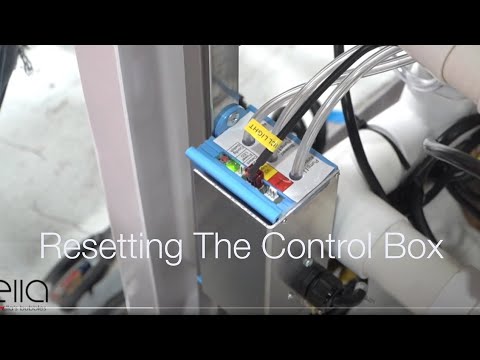
Chapters in this video
- 0:00 Disconnect Main Power Supply The video begins by showing how to disconnect the main power supply to the control box, and the green LED light goes out.
- 0:13 Disconnect All Function Connections The technician disconnects all function connections to the control box, recommending that each connection is marked before removal.
- 0:38 Disconnect Air and Water Pumps The technician disconnects all electrical connections to the air and water pumps that the tub may have.
- 0:59 Locate and Press Config Switch The technician locates the config switch on the control box and presses it until the green LED light cycles through its configuration process.
- 1:31 Reconnect Tub Components The technician reconnects all the tub's components, including the air and electrical lines, ensuring each is secured firmly.
- 1:49 Test All Tub Functions The technician tests all the tub's functions, including air, water, micro bubbles, and LED lights, to ensure they are working correctly.
Common Questions
Why do my buttons feel dead when the tub still has power?
Is it safe to work on the push buttons myself?
What does the click from the control box tell me?
Why does one massage work while another does not?
How hard should I press the buttons on my tub?
Does Ella send a technician when my buttons stop working?
About this guide. Answers in the Ella’s Bubbles Support Center are compiled from real conversations with tub owners, our technicians’ notes and the product documentation, then reviewed by our team. Tub models and options have evolved over the years, so a detail here may differ slightly from your exact tub. If something looks different on yours, send us your serial number and a specialist will confirm it for your model.
Did this solve your question?
If not, open a ticket and our team will pick it up from here.
Open a Support Ticket Videos