


Air pump stopped working: does Ella or my installer handle the warranty?
Updated October 2026
Ella's Bubbles handles the warranty on the air pump, not your installer. The pump is covered under the Lifetime Limited Warranty as supporting equipment for the original owner at the original installation address, and once the team verifies the fault, the replacement pump ships to you at no charge, while the labor to fit it is your installer's or a local licensed electrician's, because Ella does not send technicians. The tests that confirm whether the pump itself has failed are laid out in Air Pump Whines or Stopped Working: Tests Before Replacement and How a New Pump Ships, and this page sorts out who does what from the first ticket to the finished swap.
Who Does What
| Step | Ella's Bubbles | Your installer or a local licensed electrician |
|---|---|---|
| Warranty claim and verification | Reviews your ticket, photos and test results and confirms coverage | Not involved; an installer cannot grant or deny Ella's warranty |
| Replacement pump | Ships the matched pump under the lifetime parts warranty after verification | Receives it at the tub and confirms it matches the old one |
| Diagnosis | Guides the tests by phone or video while someone is at the tub | Runs the plug-in and port-swap tests under the access panel |
| Labor to remove and fit the pump | Not covered and not performed | Does the swap; the labor cost is between you and your contractor |
| Technician visit | None; Ella has no field service crew | The person on site |
| Labor warranty on the original installation | Not Ella's to give | Warranted by the installer who did the work |
What this means for you: the two halves of the job have two different owners. The part comes from Ella, under Ella's published terms, and no one else can promise or refuse it on Ella's behalf. The hands-on work comes from whoever you hire locally, and any warranty on that work is theirs. If your installer offered a labor warranty when the tub went in, that is the warranty to ask about for the swap itself, and it runs alongside Ella's parts warranty rather than replacing it.
What the Warranty Covers on the Air Pump
The Lifetime Limited Warranty covers the bathtub shell, frame, door, seal and finish, and all supporting equipment including motors, pumps, fixtures and electronic controls, as parts only. It belongs to the first purchaser, is nontransferable and is tied to the original installation address, so it does not apply to a tub that has changed hands or been relocated. It excludes tubs modified or repaired by anyone other than Ella's Bubbles, and Ella is not bound by warranty promises made by dealers, retailers, distributors or contractors. Labor, installation and removal are never covered: Ella ships the replacement part free of charge after verification, but is not liable for incidental expenses or material charges connected with removing or replacing the product or its parts.
The warranty also has to be in force. Activation requires the two-page activation form, completed and signed by both the customer and the installer, to be returned to Ella's Bubbles, and the online form is at ellasbubbles.com/warranty-activation/. If you are not sure whether yours was activated, say so in your ticket and the team will check.
Before You File: The Tests That Decide What Ships
The team ships a pump when the pump is the problem, and tightens or redirects when it is not. Run these checks first, with the tub empty and the large magnetic access panel removed, and send the results with your ticket.
- Plug the pump straight into the wall. Unplug the air pump from the port labeled Load #1 on the back of the blue control box and plug it directly into the outlet. It is safe to run the air pump dry. If it starts immediately at full blast, the pump is fine and the fault is in the button hose, the box or the wiring. If it does nothing, the pump itself is the problem; unscrew the white PVC attachment on the front, look inside, and report what you find.
- Swap the pump plugs on the box. Fill the tub above the jets first, because the water pump must not run dry. Plug the hydro pump into the air pump's port and press the bubble button, then plug the air pump into the hydro pump's port and press the water button. A pump that runs from the wall but from neither port points to the control box; one that runs from one port but not its own points to that port or the button hose.
- Check the button hose. The air button's hose plugs into the middle port labeled Blower/Pump #2 Airswitch, and the light hose is on the bottom port labeled Light Airswitch. Seat the air hose, then swap the two hoses and press the light button to confirm the button and hose are sending a signal.
Two things come before those tests. Reset the GFCI outlet serving the tub and confirm the green power light on the control box, as explained in why the jets on a walk-in tub stop working; the electrical connections video on this page shows the green indicator and a pump that was simply not plugged in. Also relieve any air lock in the button tube, which the second video shows: disconnect the air tube at the relay switch, let it relieve, and reconnect it. A high-pitched whine, rather than silence, is usually air escaping at a loose white PVC connection on the front of the pump, and tightening it is the fix, not a new pump. One more normal sound: about 20 minutes after the air pump is switched off, the Auto Purge runs for 120 seconds to blow water out of the air lines. It is automatic, cannot be stopped, and is not a fault.
How to File the Claim
- Open a ticket at ellasbubbles.com/support or call (800) 480-6850.
- Include your model and serial number. The serial is on the label behind the magnetic access panel next to the door.
- Attach a photo of the pump label and a description of what the pump does and does not do, with your results from the tests above.
- Add your contact and shipping details, and a copy of your purchase receipt so the team can confirm warranty status.
- If the pump makes a noise, record a short video of it while the system runs. Loud noise from the pump or heater area explains what to send and why the fastest path is your installer calling from the tub while support is on the line.
Once the claim is verified, the matched pump is tested and shipped to the original installation address at no charge. If the replacement does not look like the one under your tub, do not connect it until the team has compared photos of both; is the replacement air blower the right one for my tub walks through that check. When support has confirmed a faltering pump and a replacement is on the way, the tub can usually still be used until the swap, but confirm that for your case.
If Your Installer Tells You Something Different
Installers are sometimes the first to say a pump is or is not covered. Coverage is decided by Ella's Bubbles against the published terms, and Ella is not bound by what a contractor promises, in either direction. Take the question straight to the team with your serial number and receipt. The same split applies to the hydro pump: Ella matches and ships the part, and your plumber or electrician fits it, as described in how a replacement water pump is matched and shipped.

Chapters in this video
- 0:00 Troubleshooting Massager Malfunctions The technician explains that a common problem with massagers not working is an unplugged pump or component.
- 0:27 Checking Pump Power Connections The technician advises checking the pump and its power cord to ensure it is properly powered up.
- 0:42 Verifying Control Box Power The technician shows how to check the control box for a green light indicator, which means power is flowing to it.
Watch: Proper Electrical Connections with chapters and a full transcript.
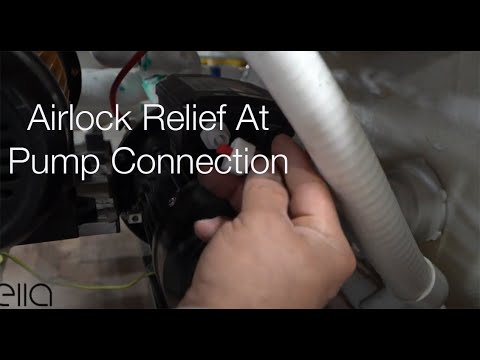
Watch: Ella's Bubbles: Relieving Air Lock at the pump connection with chapters and a full transcript.
Common Questions
Is my air pump covered under the Ella warranty?
Does Ella send a technician to replace the pump?
Who pays for the labor to swap the pump?
Can my installer file the warranty claim for me?
What should I check before reporting a dead air pump?
Is the burst of air pump noise after my bath a fault?
About this guide. Answers in the Ella’s Bubbles Support Center are compiled from real conversations with tub owners, our technicians’ notes and the product documentation, then reviewed by our team. Tub models and options have evolved over the years, so a detail here may differ slightly from your exact tub. If something looks different on yours, send us your serial number and a specialist will confirm it for your model.
Did this solve your question?
If not, open a ticket and our team will pick it up from here.
Open a Support Ticket Videos