


What Should I Do When Tub Buttons Stop Responding and Pumps Keep Running?
Switch the tub off at its breaker. Cutting power at the breaker is the correct interim step whenever a pump or blower keeps running and the deck controls will not stop it, and while the tub is still full the pump is not being harmed, because the jets are covered. Turn the power off before you drain, then drain and step out as usual. Why Won't the Air or Pump Shut Off, and Is Flipping the Breaker Okay? covers the breaker step, and this page takes the full situation in order: what to do while you are still in the water, what is normal, and what to check on each control style afterward.
What to Do While the Tub Is Still Full
A pump running in a full tub is running in the condition it was built for. The damage comes later, if the pump is still running as the water drops: a pump that runs with no water above the jets is permanently damaged, and that damage is not covered. So the order of the next few minutes matters.
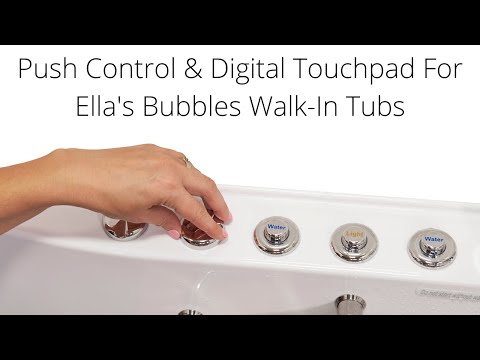
- Try the correct gesture once. On a digital touchpad the air massage does not stop with a tap. Hold the air bubble icon down for two seconds. The hydro button is pressed once to start and once again to stop. On push buttons the air massage is a counting control: the first press is high speed, the second is medium, the third is low, and a fourth press turns the system off.
- Press gently. A gentle push with the palm of the hand is enough. Pressing too hard or too deep can damage the mechanism, so repeated hard presses on a button that is not answering can make things worse.
- If the controls still do nothing, cut the power at the breaker. Do this before the tub drains, so the pump is not running when the water falls below the jets.
- Drain, then open the door. Open the drain, wait for the tub to empty completely, and exit normally. Never open the door until the tub is completely drained.
If it is the hydro pump that will not stop, the in-line heater is not a separate concern. It has no control of its own, runs only while the hydro pump runs, and stops the moment the hydro stops.
Rule Out the One Thing That Is Normal
Before treating this as a fault, check whether what you heard was the Auto Purge. About 20 minutes after the air massage is turned off, the air system starts by itself and runs for 120 seconds to blow residual water out of the air lines. It is fully automatic, it cannot be stopped from the deck, and it is normal even if it starts while you are still in the tub. During those 120 seconds the buttons will seem to be ignored, and then the blower stops by itself. The tub sounds like it is still running, but you can still drain and exit normally while the purge finishes.
The difference is easy to spot. A purge is air only, comes after the air massage was used, and ends after 120 seconds. A blower that keeps running past that, a purge that repeats when the air massage has not been used again, or a hydro pump that ignores its button is a control fault, and the checks below apply.
Push Button Tubs: What to Check Once the Tub Is Empty
Chrome push buttons work on air pressure. Pressing a button sends a puff of air down a small red tube to a relay switch inside the control box, and that relay powers the pump. When a pump will not shut off, the usual cause is a button stuck down from an air lock in its tube, which keeps the signal on. Leave the breaker off, remove the front access panel, find the blue control box, and work through this list:
- A button that stays down on the deck is an air lock. Pull that button's red tube off its nipple at the control box, let the button pop up, then push the tube back on with a twist.
- A button with a broken threaded base lets the hose leak and the switch misfire. Water or construction debris inside a button housing can do the same.
- Where the air pump is plugged in. A pump plugged into the wall outlet instead of the socket on the control box runs whenever the circuit is live, and no button will stop it.
- The relay. Restore power only with water above the highest jets, then press the button once. You should hear a click inside the box, and a second press should stop the pump. If the pump still starts by itself, the relay may have stuck closed or the box may have lost its configuration, and the control box reset is the next step.
The red tubes, the air lock release and the reset are shown step by step in Touchpad or push button controls not responding: checks, repair, and replacement.
Digital Touchpad Tubs: What to Check
The digital touchpad plugs into the display connector on the control box and does the same job the push buttons would. When a panel stops answering, confirm the gestures first, since the two second hold is the detail most new owners miss. How Do I Use Every Function on the Ella Digital Control Panel? lists each one.
If the gestures are right and the panel is still unresponsive, start with the control box reset and confirm that the touchpad cable is seated at the display connector on the control box. Then test each icon with water above the highest jets and note which icons respond and which do not. That short list is the most useful thing you can give the team. A touchpad that has genuinely failed is replaced as a single part, and none of the pumps need to come out to do it, as What Is the Digital Controller (Touchpad) on a Walk-In Tub? explains.
Getting It Repaired
Leave the breaker off between tests, and never let a pump run with the jets uncovered. If the pump still runs by itself after the checks above, open a ticket at ellasbubbles.com/support or call your Ella dealer or the team at (800) 480-6850. Have these ready:
- Your model name and your order details from where you purchased.
- A photo of the control panel or the push buttons.
- Which buttons or icons respond and which do not, and which pump kept running.
- What you have already tried, including whether a button was stuck down and whether you ran the reset.
The team confirms the part that is needed. Ella does not send technicians: parts ship under the warranty, and a local licensed plumber or electrician does the labor.
Related Guides
- Air jets will not shut off: which pump and button do I check?
- What Does the Control Box Light Mean When My Push Buttons Stop Working?
- Why Won't My Ella Digital Touchpad Respond When I Press a Button?
Related Videos

Common Questions
Is it safe for the tub to turn it off at the breaker?
Should I drain the tub before or after cutting the power?
Why does the air keep blowing after I turned it off?
Why will the air massage not stop when I tap the touchpad?
Does a failed touchpad mean the pumps must be replaced too?
About this guide. Answers in the Ella's Bubbles Ella's Bubbles Walk-In Tub Support Center are compiled from real conversations with owners, our technicians’ notes and the product documentation, then reviewed by our team. Models and options have evolved over the years, so a detail here may differ slightly from yours. If something looks different on yours, send us your serial number and a specialist will confirm it for your model.
Did this solve your question?
If not, open a ticket and our team will pick it up from here.
Open a Support Ticket Videos