


Can I upgrade my Ella walk-in tub from push buttons to a touchpad?
Updated October 2026
Yes, in many cases. The digital control can be retrofitted to an existing Ella walk-in tub: it mounts in the deck where two push buttons currently sit, plugs into the display connector on the blue control box under the tub, and is sealed in place with white kitchen and bath silicone, following the same instructions for every model as described in Where Can the Digital Control Be Mounted and How Is It Installed?. The one firm limit is the therapy package: the keypad is offered only on tubs with a combination of jetting systems, such as air plus hydro, and it cannot be fitted to a hydro-only tub.
Which Tubs Can Take the Upgrade
Whether your tub qualifies depends on what is under it, not on the model name. The digital keypad is available only on tubs with a combination of jetting systems. A hydro-only tub uses push controls with an intensity dial, and the published guidance is that a keypad on such a tub would require moving to a dual-jetting package first, so for an existing hydro-only tub the first conversation with the team is about what your tub was built with. If your tub already has air plus hydro, or more, the controller is a candidate.
On several models the controller is what normally ships. It is standard on the Shak, the Big4One and the whole two-seat family of Tub4Two, Companion, Escape and Big4Two, the Lounger's Air plus Hydro package is digital controller only, and on the Monaco it is an add-on that is not always shown on the published listing. If you own a push-button tub from another line with a dual-jetting package, the retrofit described below is how the touchpad is added. What Is the Digital Controller (Touchpad) on a Walk-In Tub? explains how the panel and the control box work together.
What the Touchpad Will and Will Not Control
The therapy systems underneath stay exactly as they are. After the upgrade, the touchpad starts the air massage with a touch of the bubble icon, steps the speed up or down with the plus and minus keys, and stops it with a two second hold. One press of the hydro icon starts the seat hydro pump and another stops it. The light control is the same as on push buttons: one press cycles the full range of colors, repeated single presses select a color, and a two second hold turns it off. On tubs with foot jets the controller turns the foot jet pump on and off. The push controls versus touchpad video on this page shows each of those gestures side by side with the push-button equivalents.
- Hydro jet intensity is still set with the chrome dial on the deck. The touchpad does not replace it.
- Microbubble therapy keeps its own push button even on touchpad tubs, and so does the independent hydro foot massage.
- Two-seat tubs with heated seats carry a separate heat keypad for each seat, independent of the digital controller.
Digital Keypad or Push Buttons: Which Therapies It Controls and Which Is Easier to Use lists these splits in full, and the warehouse confirms with you which functions stay on buttons before any loaded build.
How the Upgrade Is Arranged and Installed
- Photograph the labeled side of the blue electrical box under the tub and send it with your request through ellasbubbles.com/support, or to your Ella dealer or the team at (800) 480-6850. Digital controls are matched to the control box, so this photo is how compatibility is confirmed.
- The team confirms the control fits your system, tests it on a matching setup before it is packed, and sends a tracking number when it ships, along with the written instructions and photos of the placement options for your model. The photos are taken on the same model as yours, sometimes with the door on the opposite side, so mirror the location as needed.
- Choose the location with your installer before anything is cut. The usual spot is the deck where two push buttons currently sit, within reach from the seat. The opening cannot be undone.
- With power to the tub off at the breaker, remove the two push buttons where the control will go. The team has a video showing how to remove buttons from the top of the tub.
- Mark the opening to match the body of the control you received, confirm the opening size with the team, cut it with a router and clean up the edges so the control slides in and sits flush.
- Dry fit the control, route its cable to the blue control box under the tub and plug it into the display connector, pushing firmly for a good connection. Temporarily restore power and confirm every icon responds.
- Run a bead of white kitchen and bath silicone sealant around the control, press it into the opening, wipe away the excess and let the sealant cure before the tub is used.
The touchpad replacement video on this page shows the same deck work from the other direction: the installer protects the tub surface, cuts the silicone seal around an old pad with a straight edge, pries it free, unplugs it, plugs in the new pad, powers the tub briefly to test, then sets the pad on its two-sided tape and seals the edges with white silicone. If reach from the seat is the concern, the keypad can also be installed on the front apron of the tub rather than the deck, which is an added option to ask about. A local licensed electrician or your installer does the work, since Ella does not send technicians.
Is the Touchpad the Right Choice for the Bather?
Upgrading is not always the better experience. The standard push buttons are large and operated by a single press, so they can be pushed with the palm of the hand. The keypad's keys are smaller, which suits bathers who want finer control of the massage settings but is harder for someone who cannot see or press a small key accurately. For a bather with limited hand strength, coordination or vision, the recommendation is to keep the push buttons. If the real problem is that the existing buttons are unlabeled, which is normal on Transfer and some legacy tubs, What Does This Button on My Walk-In Tub Do? gives the key: Water is hydro, Air is the three speed air massage, Micro is microbubble, Light is chromatherapy and the flame is the heated seat.
Upgrade Versus Warranty Replacement
An upgrade from buttons to a touchpad is an option you arrange through your Ella dealer or the team, and it is a different request from replacing a touchpad that has failed. Electronic controls are among the parts covered by the Lifetime Limited Warranty, parts only, so a keypad that responds only some of the time, shows no indicator lights or switches on and off by itself is handled as a claim: support verifies it with your serial number and a photo of the control box, tests the new keypad and ships it to the original customer's address. Before assuming a keypad is dead, check that its cable has not slipped down behind the tub or worked loose at the control box. Ordering a Replacement Electronic Keypad for Your Walk-In Tub covers that path.
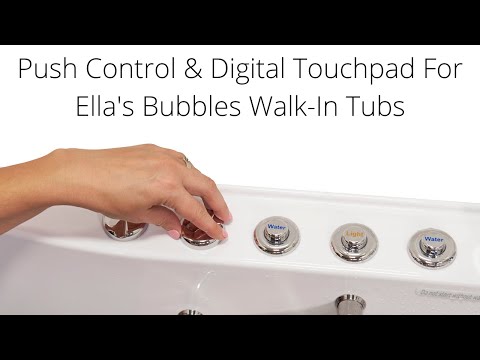
Chapters in this video
- 0:00 Push Controls Versus Digital Touchpad Ella's Bubbles walk-in tubs offer a choice between on/off push controls and a digital touchpad for easy bathing.
- 0:45 Controlling Air Massage With Touchpad The air bubble icon on the digital touchpad activates the air massage, with plus and minus buttons adjusting intensity.
- 1:21 Chromo Therapy Light Functions Chromo therapy light functions the same with both control types, cycling through colors or selecting a specific one.
Watch: Walk-In Tub with Push Controls & Digital Touchpad for Easy, Effortless Bathing | Ella’s Bubbles with chapters and a full transcript.

Chapters in this video
- 0:00 Replacing Your Digital Touchpad This video explains how to replace an Ella's Bubbles walk-in tub digital touchpad.
- 0:12 Removing the Old Touchpad The technician carefully cuts the seal around the old pad and pries it away from the tub.
- 0:44 Connecting the New Touchpad The technician connects the new touchpad and temporarily reconnects power to test its function.
- 1:03 Installing and Sealing the Touchpad The technician removes the backing from the tape, sets the new unit in place, and seals the edges with silicone.
Watch: Ella's Bubbles: Digital Touchpad Replacement with chapters and a full transcript.
Related Guides
- Why Won't My Ella Digital Touchpad Respond When I Press a Button?
- Is the digital control panel available on every Ella model and does it replace push buttons?
Common Questions
Can a hydro-only tub be upgraded to the digital touchpad?
Does the touchpad go where my push buttons are now?
Will the touchpad control the microbubbles and foot massage too?
What does the team need from me before shipping the control?
Who installs the touchpad on my existing tub?
Is the touchpad easier to use than push buttons?
About this guide. Answers in the Ella’s Bubbles Support Center are compiled from real conversations with tub owners, our technicians’ notes and the product documentation, then reviewed by our team. Tub models and options have evolved over the years, so a detail here may differ slightly from your exact tub. If something looks different on yours, send us your serial number and a specialist will confirm it for your model.
Did this solve your question?
If not, open a ticket and our team will pick it up from here.
Open a Support Ticket Videos